What Is Network Visibility?
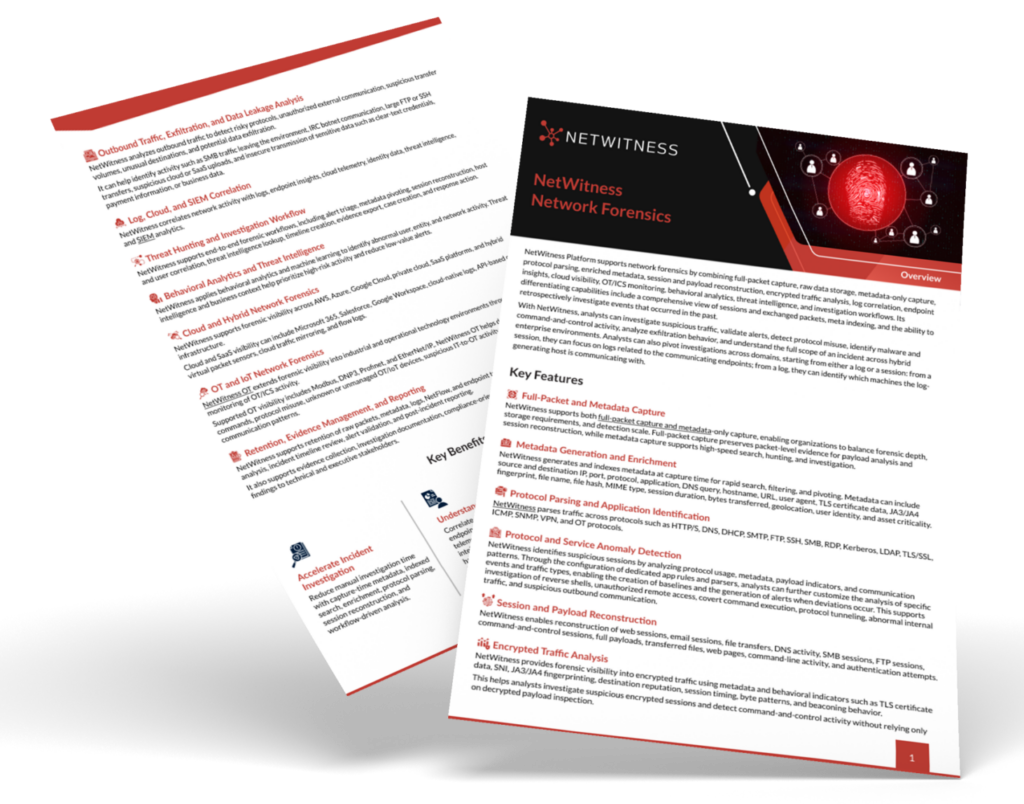
Network visibility is the ability to see, monitor, and analyse network traffic across an organisation’s IT environment. It provides security teams with insight into devices, users, applications, connections, and data moving across the network, helping them detect suspicious activity, investigate threats, and respond to attacks faster.
Introduction
A network visibility assessment reveals what parts of your environment your security solutions can see and which parts they can’t. In a large enterprise, that is typically not a short list. Each type of data centre, multiple clouds, branch offices, remote workers, and encrypted sessions generate their own type of telemetry, and each can go dark unnoticed.
The following assessment is designed for that reality in 5 stages. You’ll receive a scored worksheet on on-premises, cloud, remote-site, encrypted-traffic and east-west coverage, a breakdown of the four challenges resulting in the majority of blind spots, and a remediation order ranked by risk. It ends with the criteria to select a network monitoring solution when you’ve decided what you need.
What Is a Network Visibility Assessment?
Network visibility assessment is a systematic evaluation of what your security tools can see, and what they can’t. You’re not auditing the tools, you are auditing the processes that people use them for. You’re measuring coverage. For which segments, workloads, sites, and traffic types is it useful to have telemetry? Which are dark? Enterprise network visibility is difficult, as the network no longer is. Traffic flows through data centres, multiple clouds, branch offices, home connections, and containers that are temporary, lasting for 10 minutes. They all have their own logging model, their own owner, and their own failings. The results are a reference level. It’s also a number you can put in front of leadership and defend – a rare thing in security.
Why Network Visibility Matters for SOC Visibility
The only thing that an analyst can investigate is what they can see. All downstream relies on that. For network threat detection, traffic data must be available, complete and held long enough to be useful. If there is no lateral movement between two servers of the internal network, then there will be no detection rule that will pick it up. If it’s just a log of encrypted sessions, there’s no way to know if the session is taking place to learn the software or exfiltrate data.
Low SOC visibility also slows down response time. Individuals waste hours trying to connect half logs instead of answering a single question. Attack surface is affected, too. What can be defended, if not what’s known, and shadow IT, shadowy cloud accounts and unmanaged devices are where many breaches begin.
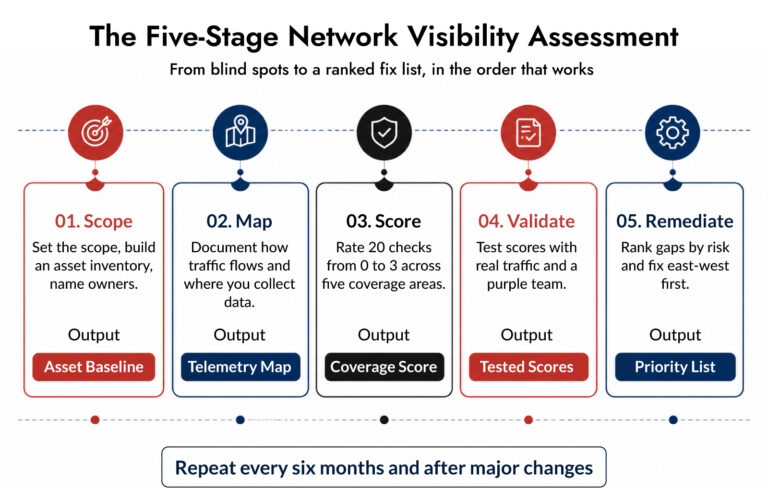
The Five-Stage Network Visibility Assessment
Each stage builds on the last. Resist the urge to jump straight to scoring.
Stage 1: Define Scope and Build the Asset Baseline
Determine scope of work with a large enterprise, that typically includes all your data environments where business data traverses: data centers, public cloud accounts, remote sites, remote workforce connections, and partner links. After that, create a baseline inventory. Source from your CMDB, cloud provider consoles, and DHCP, DNS logs and endpoint management tools. Don’t be surprised if the sources have conflicts. Those differences are findings, it is not a mistake! Any device which appears in DHCP but not in your CMDB is a potential blind spot. Identify one person to be responsible for each environment. Delayed remediation when there are no owners. At this stage, the traffic flow and telemetry sources are mapped.
Stage 2: Map traffic flows and telemetry sources
Ttraffic flow and telemetry sources are mapped. Record Traffic movement and where data is collected. Write down what you have for each environment: packet capture, NetFlow/ IPFIX, cloud flow logs, firewall logs, DNS logs, proxy logs, endpoint data. Draw the flows that are most significant. Internet access and egress is simple. The more difficult ones are east-west paths between application tiers, data center connections and traffic between cloud VPCs and on-prem systems. That’s where most teams will find out that network monitoring is in pockets. Perimeter is well covered. Data center core does contain flow data, no packets. The clouds are filled with logs that are nobody’s reading. Record everything!
Stage 3: Score Coverage With the Worksheet
This is the core of the assessment. Rate every question from 0 to 3.
- 0: No coverage
- 1: Partial coverage, low confidence
- 2: Good coverage with known gaps
- 3: Full coverage, validated in the last 12 months
Be honest. A 3 means you tested it, not that you believe it.
Network Visibility Scoring Worksheet
| Coverage area | What to check | Score (0 to 3) |
| On-premises | All data centre segments feed a sensor or flow collector | |
| Core, distribution, and server VLAN traffic is captured, not just the perimeter | ||
| Logs and traffic data are retained at least 30 days for investigation | ||
| Unmanaged and IoT devices are discovered and monitored | ||
| Cloud | Flow logs are enabled in every account, subscription, and project | |
| Traffic mirroring or virtual sensors cover critical workloads | ||
| Container and serverless traffic is observable | ||
| Cloud telemetry lands in the same place as on-prem telemetry | ||
| Remote sites | Every branch and plant has traffic monitoring or a defined collection method | |
| Remote workforce traffic is visible through VPN, SASE, or agent-based data | ||
| Site telemetry is centralized without saturating WAN links | ||
| New sites are onboarded into monitoring before go-live | ||
| Encrypted traffic | TLS session metadata (versions, certificates, JA3 or similar fingerprints) is captured | |
| A decryption policy exists for high-risk traffic, with documented exceptions | ||
| Analysts can spot anomalies in encrypted flows without full decryption | ||
| Certificate and protocol misuse generates alerts | ||
| East-west traffic | Server-to-server traffic inside the data centre is monitored | |
| Cloud workload-to-workload traffic is monitored | ||
| Lateral movement protocols (SMB, RDP, WinRM, SSH) are tracked internally | ||
| Segmentation rules are verified against observed traffic |
Four questions per area means a maximum of 12 per area and 60 overall.
How to read your results
| Total score | What it means |
| 0 to 20 | Critical gaps. Attackers can move freely and you’d likely find out late. |
| 21 to 38 | Uneven coverage. You catch some activity but can’t reconstruct incidents reliably. |
| 39 to 50 | Solid base. Focus on your weakest area and on validation. |
| 51 to 60 | Strong. Keep testing, because environments drift. |
The shape matters more than the total. A 40 with one area stuck at 3 out of 12 is more dangerous than a flat 40. Attackers go for the weakest path, so your lowest area sets your real exposure.
Stage 4: Validate With Real Tests
Scores based on documentation are guesses. Test them.
Produce good traffic between two east-west hosts and see if you can see it on your tools. Start up a test VM in a cloud account and measure the time taken until it appears in monitoring. Run a test VM in a cloud account and measure the time required to see the VM in monitoring. Make a connection from one branch office to another through a strange port and follow it all the way to the destination.
Even better is to conduct a purple team exercise or break and attack simulation. Choose 3 techniques like internal port scanning, SMB lateral movement, DNS tunnelling. Record in each instance if it was seen, if it could be detected and if it was investigated. Those are three different outcomes and teams tend to mix them up.
Update your scores afterward. They usually drop.
Stage 5: Prioritize and Remediate
Rank findings by risk, not by how easy they are to fix. The next section shows how.
Prioritized Remediation Paths
Most gaps trace back to the four challenges above, plus staffing limits. The paths below follow the worksheet areas, ordered by what usually cuts risk fastest.
Priority 1: East-west traffic
A low score here means an attacker with one foothold can roam. Fixing it has the largest effect on network threat detection.
- Deploy sensors or taps at data center aggregation points and critical server segments.
- Capture full packets where investigations matter most, like domain controllers, databases, and file servers. Use flow data elsewhere.
- Extend monitoring into cloud workloads with virtual sensors or traffic mirroring.
- Compare observed traffic against intended segmentation rules and fix the mismatches.
Priority 2: Cloud
Cloud coverage tends to be the most uneven, because teams create accounts faster than security reviews them.
- Enforce flow log collection through policy so new accounts inherit it automatically.
- Send cloud telemetry to the same analysis platform as on-prem data. Two consoles means two investigations.
- Cover workloads holding regulated or business-critical data first.
Priority 3: Encrypted traffic
You rarely need to decrypt everything. Often you shouldn’t.
- Start with metadata. Certificate details, handshake fingerprints, session timing, and byte patterns reveal a lot.
- Decrypt selectively where policy and privacy rules allow, such as outbound server traffic or connections to uncategorized destinations.
- Document exceptions so auditors and analysts both know what’s blind and why.
Priority 4: Remote sites and remote workers
- Use lightweight collection at branches, such as flow export or small virtual sensors. Forward metadata instead of raw packets to protect bandwidth.
- Add monitoring to the site onboarding checklist.
- For remote workers, combine VPN or SASE logs with endpoint telemetry. This also covers part of the personal device problem, since endpoint data follows the user.
Priority 5: On-premises gaps
These are usually the cheapest to close because the infrastructure is yours. Fix retention first. Thirty days of searchable data beats six months of unsearchable archives, and it’s what network forensics relies on when an incident surfaces weeks after initial access. Then deal with rogue and unmanaged devices through regular discovery scans.
If two areas tie, fix the one protecting your most sensitive data first
Enterprise Network Visibility Challenges
It is helpful to understand the reasons for gaps forming before scoring anything. Most of them are related to four challenges, each of which corresponds to a section of the worksheet in which you will work in a moment.
Remote Access
Teleworkers are accessing remotely from various locations, devices, and networks. Home Wi-Fi traffic could never reach a corporate sensor. There are personal devices too, as they introduce additional security and compliance issues which a managed laptop does not. The result is a moving edge! While it is still important to monitor the perimeter, it is no longer the case that a significant percentage of users are actually at that perimeter.
Network Blind Spots
There are a handful of offenders that cause blind spots: Encrypted traffic, rogue devices, and cloud services that were never onboarded. Every one of them conceals actions from the tools supposed to discover dangers. They are hurt twice by these gaps. They hinder system security detection and they complicate the problem of performance issues. Troubleshooting becomes a guessing game when a slow application goes back to a segment that no one is watching.
Disadvantages of Visibility Tools
Tools create blind spots of their own. Some are unable to view encrypted traffic, and thus are limited in what they can see. Others are having difficulties with scaling. What may work fine in a lab or a medium-size network may end up losing packets or sampling so much that detail is lost in a large enterprise network. That is why the tool selection process is not a prerequisite to the assessment process, but is conducted in the wake of the assessment process.
Network Complexity
The network is dynamic year after year with cloud, IoT and virtualization. Software-defined networking and network function virtualization further accredit. Workloads are spun-up, moved and deleted. Pathways are not ticketed. The most affected are traffic volumes between workloads. Static monitoring designs fail with that east-west movement.
How the Challenges Map to the Worksheet
| Challenge | Worksheet area it affects most |
| Remote access | Remote sites |
| Network blind spots | Cloud, on-premises, encrypted traffic |
| Limitations of visibility tools | Encrypted traffic, east-west traffic |
| Network complexity | Cloud, east-west traffic |
Keep this table handy. When a score comes back low, it tells you which underlying problem to look for.
How to Choose a Network Monitoring Solution for Large Enterprises
Once you know your gaps, tool selection gets much less abstract. You’re shopping against a scored list, not a vendor brochure. And because tool limitations are one of the four challenges, these criteria are built to expose them.
- Coverage match. Does it monitor every area where you scored low, including cloud and east-west, without separate products stitched together?
- Encrypted traffic handling. Can it analyze TLS metadata and behavior without forcing full decryption everywhere?
- Data depth. Can it keep packet-level detail where you need it and metadata where you don’t?
- Scalability. Test at your real throughput with headroom. Ask for performance numbers under load, not at idle.
- Analytics quality. Look at how it supports network traffic analysis, behavior-based detection, and mapping findings to known attacker techniques.
- Investigation workflow. An analyst should move from alert to full session reconstruction in a few clicks. This is where network forensics capability shows up in practice.
- Integration. SIEM, SOAR, EDR, and ticketing connections should be native or well documented.
- Operational load. Count the people needed to run it. A powerful tool nobody has time to tune becomes shelfware.
- Retention and cost model. Volume-based pricing can punish you for improving coverage. Understand it before you sign.
Run a proof of concept on your own traffic. Vendor demos use clean data.
Network Visibility Readiness Guide
Discover how to identify blind spots, monitor traffic across cloud and on-prem environments, and strengthen detection with a practical 7-step evaluation framework. Download the guide to improve investigation speed and security clarity.
Maintaining Enterprise Network Visibility
One assessment is a snapshot. Environments change weekly. Repeat the worksheet every six months, and after major events like a merger, a data center migration, or a large cloud rollout. Track scores over time so progress is visible. Give each low-scoring area a named owner and a due date.
Also treat new asset onboarding as a visibility checkpoint. If a system can’t be monitored, someone should have to sign off on running it blind.
Where NetWitness Fits in Enterprise Network Visibility
If your assessment shows weak east-west coverage, shallow encrypted traffic analysis, or investigations that stall for lack of packet data, a network detection and response platform is the usual next step. NetWitness is built for that problem. It captures and analyzes network traffic across on-premises and cloud environments, enriches it with metadata, and lets analysts reconstruct sessions during network forensics work. It also brings network data into the same workflow as logs and endpoint data, which helps SOC teams that currently pivot between several consoles.
Use your worksheet results when you evaluate it, or any other platform. Bring your lowest-scoring areas to the proof of concept and test those first.
Conclusion
Improving network visibility in a large enterprise starts with knowing where you’re blind. The five stages give you that picture: scope the environment, map your telemetry, score coverage, test your scores, and fix gaps in order of risk.
The four challenges explain why gaps keep forming. Remote access moves the edge. Blind spots hide activity. Tools hit their limits. Complexity changes the network faster than monitoring keeps up. None of these go away, which is why the assessment has to repeat.
Run the worksheet this week. Even a rough first pass will show you which area is weakest, and that’s where your next budget conversation should begin.
Frequently Asked Questions
1. What is a network visibility assessment and why is it important?
It’s a structured review of which parts of your network produce usable security telemetry and which don’t. It matters because detection and investigation both depend on seeing traffic. Gaps in visibility become gaps in defence, and they’re usually discovered during an incident, which is the worst time.
2. How to perform a network visibility assessment for improving cybersecurity?
Follow five stages. Define scope and build an asset baseline, map traffic flows and telemetry sources, score coverage across on-premises, cloud, remote-site, encrypted-traffic, and east-west areas, validate scores with real tests, then prioritize fixes by risk. Repeat every six months.
3. What are the benefits of using network visibility assessment platforms?
They automate asset discovery, show coverage gaps continuously instead of once a year, and cut the manual work of comparing inventories against telemetry. Teams also get faster investigations, better audit evidence, and a clearer case for budget requests.
4. How to choose the right network visibility solution for a large enterprise?
Start from your assessment scores. Match the tool to your weakest coverage areas, then test throughput, encrypted traffic handling, analytics quality, integrations, and analyst workflow in a proof of concept using your own traffic. Check staffing needs and the pricing model before committing.
5. What Should You Look for in Network Visibility Assessment Solutions With Real-Time Monitoring Capabilities?
Look for solutions that combine live traffic capture, behavioral analytics, and alerting in one workflow. They should cover east-west traffic, cloud workloads, and remote sites, not just the perimeter. Check that alerts link straight to stored sessions, and that retention is long enough to investigate days after an alert fires.
6. What Are the Steps to Deploy a Full-Stack Network Performance Monitoring System?
Define your goals and the services that matter most, then inventory devices, links, and cloud resources. Pick collection methods like SNMP, flow data, packet capture, and synthetic tests, and deploy sensors at the core first. Set baselines for latency, packet loss, and throughput, alert from those instead of defaults, integrate with security tools, and tune monthly for the first quarter.
See Every Packet. Understand Every Threat.
- Capture Network Traffic
- Reconstruct Attacker Sessions
- Uncover Hidden Threats
- Accelerate Investigations