What is the best way to choose a log monitoring tool for an enterprise?
The best way to choose a log monitoring tool is to evaluate how well it supports enterprise log monitoring at scale. Look for centralized log collection, real-time threat detection, strong integration with SIEM log management, and fast log analysis tools. The ideal solution should reduce investigation time, handle high data volumes, and provide clear insights instead of just storing logs.
Introduction
If your enterprise runs on more than a handful of servers, picking the wrong log monitoring tool can quietly cost you a fortune in missed threats, failed audits, and engineering hours spent digging through raw files with no context.
The market is full of options. Some are genuinely powerful. Others are overpriced dashboards dressed up in security language. The challenge isn’t finding a tool it’s figuring out which one fits your infrastructure, your team, and the specific risks you actually face.
This guide breaks down what to look for, what to avoid, and how to make a call you won’t regret six months into a contract.
Why Log Monitoring Is Not Optional at Enterprise Scale
Before getting into selection criteria of log monitoring tool, it helps to understand what’s really at stake.
At enterprise scale, you’re dealing with logs from hundreds sometimes thousands of sources: web servers, databases, firewalls, cloud workloads, SaaS applications, authentication systems, containers. Every one of those sources generates a stream of events. Most of them are noise. Some of them are signals you cannot afford to miss.
When a breach happens, the evidence almost always lives in the logs. The attackers who went undetected for 200+ days in high- profile incidents weren’t invisible they were just quiet, and nobody was watching closely enough. Proper IT log monitoring tools change that math dramatically.
Beyond security, there’s compliance. SOC 2, PCI DSS, HIPAA, ISO 27001 every major framework requires you to collect, retain, and be able to produce audit logs. Without enterprise log monitoring in place, a compliance review is a fire drill.
And then there’s just operational sanity. When a production service goes down at 2 AM, the team that finds the root cause fastest is usually the one with the best log visibility.
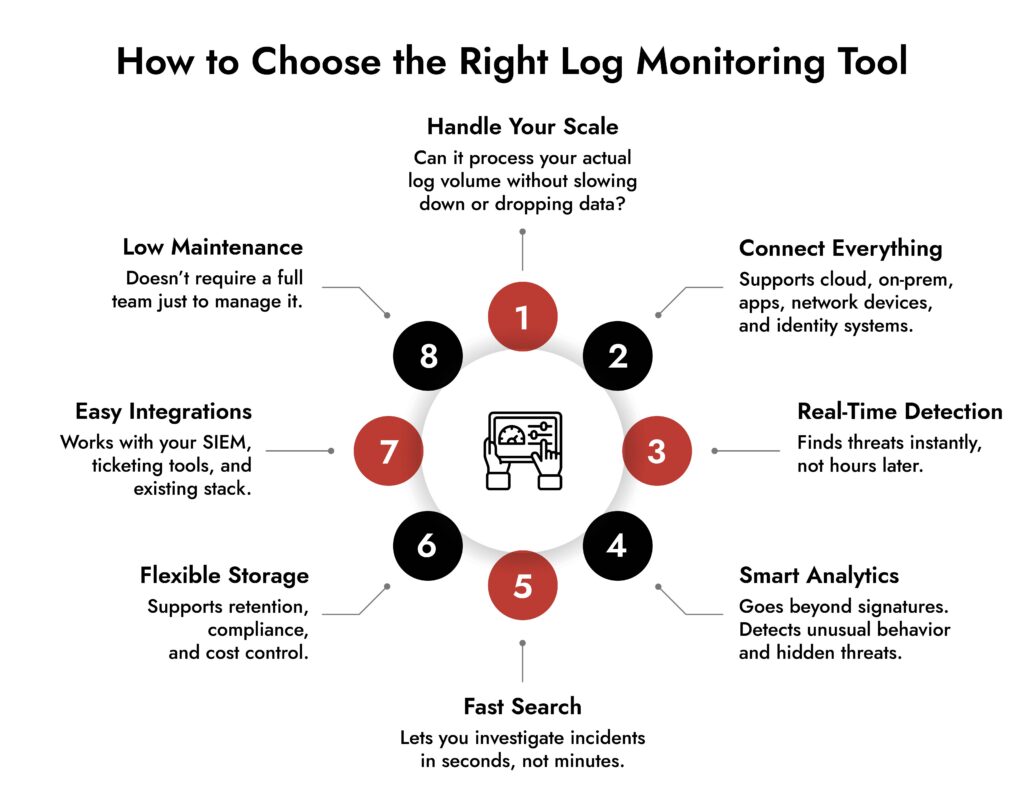
The 8 Things That Actually Matter When Evaluating Log Monitoring Software
1. Ingestion Scale and Performance
The first question to ask any vendor: how does your platform perform at our log volume?
Not peak demo volume. Your actual projected volume measured in events per second or gigabytes per day. Enterprise environments can generate millions of log events per minute across all sources. Log monitoring tools that work fine at 10GB/day often start dropping events, adding latency, or simply falling over at 500GB/day.
Ask for benchmarks. Ask about ingestion guarantees. Find out what happens when you spike say, during a security incident when log volume can jump 10x in minutes. If the vendor gets vague here, that’s a real answer.
2. Data Source Coverage
A tool is only useful if it can actually talk to your infrastructure. Check for native support not just theoretical integrations with:
- Cloud platforms (AWS CloudTrail, Azure Monitor, GCP Logging)
- Kubernetes and containerized environments
- On Prem servers running Linux and Windows
- Network devices (Cisco, Palo Alto, Fortinet, Juniper)
- Identity platforms (Active Directory, Okta, Azure AD)
- SaaS applications like Salesforce, Microsoft 365, Google Workspace
- Custom applications via syslog, APIs, or file based collection
The more you have to build and maintain custom parsers, the more your engineering team ends up babysitting the tool instead of using it.
3. SIEM Log Management Capabilities
If your enterprise has any security functions at all, you’re probably looking for a platform that combines log management with SIEM grade analysis. SIEM log management means more than just storing logs it means correlating events across sources, building timelines, and surfacing patterns that look suspicious even when no individual event is alarming.
Look for correlation rules that run in real time, not batch. Look for the ability to create custom detection logic, not just rely on out of the box signatures that every attacker already knows about. And look for alert fatigue controls a SIEM that fires 800 alerts per day trains your team to ignore them. n
4. Threat Detection Quality
This is where the real differentiation lives among log analysis tools. The basic question: how does the platform find threats?
Signature based detection is table stakes. Any decent tool matches known bad patterns. The harder problem is detecting anomalies of user behaviors that are unusual, lateral movement that does not match any specific signature, exfiltration that looks like normal traffic if you’re only checking one log source at a time.
Look for:
- User and Entity Behavior Analytics (UEBA) does the platform build baselines for normal behavior and flag deviations?
- Cross source correlation can it connect a failed authentication in one system to a suspicious process spawn in another, happening 4 minutes later?
- Assisted detection not AI marketing, but actual anomaly detection with tunable sensitivity
- Threat intelligence integration does it enrich events with external indicators of compromise?
Threat detection quality is hard to evaluate from a demo. Push vendors to show you detection scenarios from real incidents, not scripted presentations.
5. Search and Query Performance
When you’re in the middle of an incident investigation, every minute of query latency matters. Log management tools that take 34 minutes to return results across 30 days of data will seriously impede your response time.
Test this directly. Take a realistic data volume, run a complex cross source query spanning multiple weeks, and time it. The difference between 10 seconds and 3 minutes in a tense incident is not trivial.
Also evaluate the query language. Some platforms use SQL like syntax. Others have proprietary languages. Some have natural language interfaces. The right choice depends on your team but make sure whoever will be using the tool can become fluent in it without a month of training.
6. Retention, Storage Economics, and Compliance Controls
Log retention is genuinely complicated at enterprise scale. You may need 90 days of hot search, 12 months of warm access, and 7 years of cold archival all with different cost profiles.
Log management software pricing models vary wildly. Some charge per GB ingested. Some charge per GB stored. Some charge per query. Some charge by the number of sources. Understand the full cost model before you sign anything, because what looks affordable at 50GB/day looks very different at 500GB/day.
On the compliance side, check for immutable storage options, audit trails for who accessed what logs, role based access controls on log data itself, and built-in reports for common frameworks. Some platforms have prebuilt compliance dashboards for PCI, HIPAA, and SOC 2 that can save significant time come audit season.
7. Integration With Your Security and Operations Stack
Log monitoring tools don’t live in isolation. They need to send alerts to your SIEM if they’re not the SIEM. They need to open tickets in ServiceNow or Jira. They need to feed into Splunk, Datadog, Elastic, or whatever observability platform your team already lives in. They need webhook support, native integrations, or a solid API.
Before committing, map out every system you’d need the log platform to talk to and confirm those integrations actually exist and work. “We support it via the API” can mean anything from a polished native connector to a single undocumented endpoint with no official support.
8. Operational Overhead and Total Cost of Ownership
There’s the license cost. Then there’s the actual cost: the time your team spends deploying, configuring, tuning, upgrading, and troubleshooting the tool itself.
Some log management software requires dedicated platform engineers just to keep it running. Others are genuinely low maintenance SaaS products where you’re up in a day. Neither is wrong by default but you need to be honest about your team’s capacity.
Ask vendors: What does Day 1 deployment look like? What about Day 90 when you’ve added 30 new log sources? How long does tuning detection rules typically take? What does their support look like when something breaks at 3 AM?
Build vs. Buy vs. Managed Service
For larger enterprises, this question comes up every few years. Building your own log pipeline with opensource tools gives you maximum control and can be cheaper at very high volumes if you have the engineering talent to run it. The tradeoff is real: you own everything, including every failure.
Buying a commercial platform (Splunk, Datadog, Elastic, Sumo Logic, IBM QRadar, Microsoft Sentinel, and many others) gets you to production faster and puts support and development on the vendor. The tradeoff costs and vendor lock in.
A managed security service provider (MSSP) running a log monitoring and SIEM function on your behalf is worth considering if your security team is lean or you need 24/7 coverage without building an internal SOC. The tradeoff is less visibility into what’s actually happening day today.
Most enterprises land on a hybrid: a commercial platform with tight API integrations and selective use of opensource tooling for high-volume, lower sensitivity log streams where the economics of commercial ingestion pricing don’t make sense.
Simplify Log Management and Threat Detection with NetWitness® Logs
-Centralize and analyze logs from across your environment in one platform.
-Detect threats faster with real-time visibility and automated correlation.
-Reduce noise through advanced filtering and context-driven analytics.
Red Flags to Watch For During Evaluation
Vendors who can’t demo your actual data. If they’ll only show you pre-staged environments with clean, perfect data, ask what happens with your messy, mixed format production logs.
Pricing that’s hard to calculate in advance. Surprises on a log monitoring bill can be enormous. If you can’t model your cost at 2x and 5x your current volume before signing, you’re taking a real risk.
Weak multitenancy and RBAC. At enterprise scale, different teams, business units, or clients should only see their own data. If the access control model is coarse-grained, that’s both a security and a compliance problem.
No real answer on false positive rates. Every vendor claims their threat detection is accurate. Ask them for the false positive rate from actual customer deployments. If they pivot talking about tuning capabilities rather than giving you a number, that’s telling.
Locked in data formats. If extracting your own log data requires going through a vendor’s API with rate limits and no bulk export option, that’s a serious problem for both portability and compliance.
A Practical Evaluation Framework
Here’s a process that works in the real world:
Step 1 – Define your requirements before talking to vendors. Document your log volume, sources, retention requirements, compliance obligations, team size, and top three use cases (incident response, compliance reporting, operational troubleshooting, etc.). This protects you from getting sold rather than being evaluated.
Step 2 – Build a shortlist of 34 platforms. Based on your primary use case security first, observability first, or compliance first, the leading platforms are different. Don’t evaluate 10 tools. Your team’s time is valuable.
Step 3 – Run a proof of concept with real data. At least two weeks. Connect your actual log sources. Run real searches. Test alert creation. Measure search latency. Have your SOC analysts and infrastructure engineers both weigh in.
Step 4 – Stress test the pricing model. Run the numbers at your current volume, at 2x, and at 5x. Include storage costs, support tiers, and professional services for deployment.
Step 5 – Check references from similar companies. Not case studies the vendor picked. Ask for references from companies in your industry, at your scale, with your use cases. Talk to those customers directly.
How Enterprise Requirements Differ From SMB
It’s worth explicit about this. Most vendor marketing is aimed at the middle of the market. Enterprise requirements genuinely differ in a few important ways.
Scale. Ingesting logs from 10,000 hosts is fundamentally different from 100. The architecture of the tool, not just the pricing tier, needs to support it.
Regulatory complexity. You may need to comply with multiple overlapping frameworks across different regions simultaneously. The tool needs to support that, not just claim it does.
SOC integration. If you have a security operations center, the log monitoring platform is a primary workflow tool for your analysts. Analyst UX matters as much as backend performance.
Geographic data residency. Many enterprises need logs from EU systems to stay in EU infrastructure or have similar restrictions by region. Not all cloud hosted log management software supports this well.
Change management and deployment velocity. Adding new log sources in a 5,000-person enterprise involves changing control processes, security reviews, and coordination across teams. A tool that requires two weeks of professional services to add a new source type will slow you down constantly.
Why NetWitness Stands Out for Enterprise Log Monitoring
For security-first enterprises, NetWitness is worth serious consideration. Here’s why:
- Built for security from day one — not an IT ops tool with security bolted on later
- Correlates logs, network packets, and endpoint telemetry together — so attackers staying quiet in logs still get caught
- Behavioral analytics, not just signatures — surfaces insider threats, credential abuse, and multi-stage attacks that signature rules miss
- SOC-native analyst workflow — pivot from alert to full event timeline without switching tools
- Flexible deployment — on-premises, cloud, or hybrid, with full support for data residency requirements
- Integrated threat intelligence — enriches every event with external indicators of compromise in real time
Closing Thoughts
There’s no single right answer here. The best enterprise log monitoring tool is the one your team will use, that covers log sources you care about and performs reliably at your scale without making the economics unworkable at higher volumes.
What separates good decisions from bad ones in this category is doing the work before signing. Evaluate with real data. Stress tests pricing. Talk to actual customers. And make sure both your security team and your infrastructure team have input, because they’ll have very different priorities and both matters.
The log data exists. The question is whether your platform is actually turning it into a signal.
Frequently Asked Questions
1. What are log monitoring tools used for?
Log monitoring tools collect, analyze, and correlate log data to detect anomalies, troubleshoot issues, and support security operations.
2. How do log analysis tools improve threat detection?
They identify patterns, correlate events, and highlight suspicious behavior in real time, helping teams detect threats earlier.
3. What is the difference between log management and SIEM log management?
Log management focuses on collecting and storing logs, while SIEM log management adds correlation, analytics, and threat detection capabilities.
4. How do I choose the best log monitoring software for my enterprise?
Focus on scalability, real-time analysis, integration capabilities, usability, and how well it supports your security workflows.
5. Are IT log monitoring tools necessary for compliance?
Yes. They help maintain audit trails, ensure data retention, and generate reports required for regulatory compliance.