What is AI-driven traffic?
AI-driven traffic is network activity generated by AI systems instead of people: copilots calling model APIs, agents and agentic browsers acting for users, scrapers, and automated scripts. Attackers use automation too. Because legitimate and malicious activity can look the same on the wire, investigators have far more machine traffic to sort through and fewer easy ways to tell it apart.
How AI-Driven Network Traffic Is Reshaping Network Forensics
Ask an analyst what a normal Tuesday looked like five years ago and they’ll describe people. Logins around nine. File shares. An email spike before lunch.
That picture is fading. HUMAN Security’s research on 2025 traffic found automated traffic growing 8x faster than human traffic. Monthly AI-driven volume rose 187% from January to December, and traffic from AI agents and agentic browsers grew 7,851% year over year. Scraping attempts now approach 20% of traffic, and post-login account compromise attempts more than quadrupled.
Those numbers come from web traffic, mostly in retail, streaming, and travel, so your network will look different. A defender should still care, because the same agents and automation hitting public sites also run inside your environment, and the account takeover attempts in that data end up as sessions and logs you’ll have to investigate. Treat it as the direction of travel, not a forecast for your network.
This post covers the network forensics challenges AI-driven network traffic creates or sharpens, and what investigators can do about each.
Why AI-Driven Traffic Makes Network Investigations More Complex
The old playbook was baseline, spot the outlier, dig in. That works when outliers are rare. As machine traffic grows, odd-looking is everywhere.
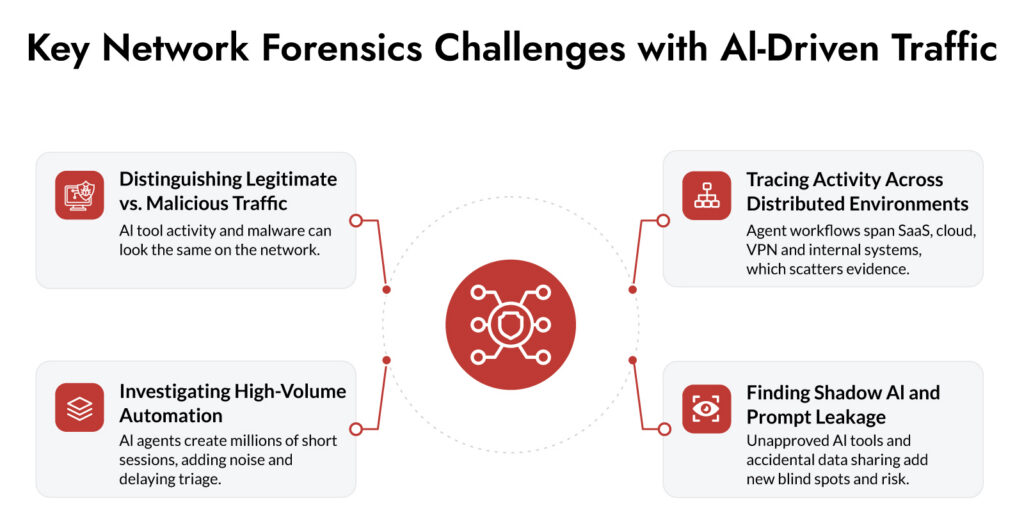
Distinguishing legitimate AI traffic from malicious activity
An approved AI assistant calling a cloud API and malware beaconing to a command server can look identical. TLS on 443, small requests, steady rhythm. Every new agent and integration adds more look-alikes.
Context is what separates them. Certificate data, SNI, hostnames, user agents, destination reputation, and the criticality of the host all matter. JA3 and JA4 fingerprints help too, but treat them as clues, not verdicts. Attackers can randomize JA3, and plenty of legitimate tools share fingerprints. The table below shows how to read these signals together.
Investigating high-volume, automated network communications
One agent workflow can open hundreds of short sessions a minute. Multiply that by every team experimenting with AI and the few sessions that matter hide among millions. Sampling is a gamble, because the dropped flow might be the one you needed.
Speed is the second problem. An agent holding valid credentials can touch dozens of services before a person reads the first alert, so triage queues built for human-paced attacks fall behind. Index metadata as traffic is captured so you can filter by application, hostname, or bytes transferred, and rank findings so the worst activity gets read first.
Storage is the third. Full capture on fast links gets expensive, so teams shorten retention or drop traffic to control cost. Then a compromise surfaces three weeks late and the packets are gone. You don’t need to keep everything. You need the right data, kept long enough, in a form you can search.
Tracing agent-driven activity across distributed environments
AI agents don’t stay in one place. A single workflow can start in a SaaS app, call a cloud API, reach an internal service through a VPN, and write to a file share, all under one user’s token. If one of those agents gets hijacked, or an attacker borrows the same path, the evidence is scattered. Each hop logs differently, often on a different clock.
You need visibility in every environment the agent can reach, plus a way to pivot between network sessions and the logs for the same hosts. Even small clock drift scrambles a timeline.
Sanctioned AI vs Malicious Beaconing: How to Tell Them Apart
No single signal settles it. Read these together.
| Signal | Sanctioned AI tool | Malicious beaconing |
| Destination | Known vendor domain listed in your approved inventory | Newly registered or low-reputation domain, or a cloud IP with no matching service |
| TLS and JA3/JA4 | Certificate matches the vendor, fingerprint fits the client app | Odd or self-signed certificate, SNI mismatch. Fingerprints can be randomized, so never rely on them alone |
| Timing | Bursts when users are active, quiet overnight | Fixed intervals around the clock, often with small jitter |
| User agent | Matches the app or SDK making the call | Generic, spoofed, or inconsistent with the process |
| Host criticality | Laptops and app servers expected to call AI services | Database servers or domain controllers with no reason to go outbound |
| Host owner | A team can name the tool and who approved it | Nobody claims it |
Two AI-Specific Forensics Challenges: Shadow AI and Prompt Leakage
Finding shadow AI traffic
Employees sign up for AI tools nobody approved. On the wire, that’s ordinary HTTPS, and no asset list mentions it. So build the inventory from the network. DNS queries, SNI, and application identification show which hosts talk to which AI services, how often, and how much data moves.
Say a developer’s laptop starts sending large uploads to an AI service you never reviewed. An analyst using NetWitness can start from that session, read the hostname and certificate details, then pivot to the logs tied to the same endpoint, all without leaving one investigation.
The limit: this tells you who uses what, not whether they should. Approving or blocking tools is policy work, and a secure web gateway usually handles it better.
Tracking sensitive data leaving through prompts
Pasting source code or customer records into a chatbot is exfiltration with a friendly interface. The session is encrypted, so network forensics sees destination, upload size, timing, and certificate data, not the prompt itself. That’s still a strong lead. An unusual destination plus a large upload from a sensitive system is exactly what you want flagged.
To learn what was actually typed, you need inline inspection or DLP. Pair the two and you get both what and when.
How AI and Machine Learning Improve Network Traffic Analysis
AI in cybersecurity is also the practical answer here, since nobody reads machine-speed traffic by hand. Machine learning for network security earns its place in three areas.
Detecting behavioral anomalies across network activity
Models learn what normal looks like for devices, users, and services, then flag drift. A database server that suddenly beacons every 60 seconds. A laptop that sends ten times its usual outbound bandwidth. Because this approach never reads content, it works on encrypted sessions and catches threats no signature covers.
Correlating threat indicators to accelerate investigations
An unusual DNS request is background noise. Add a rare outbound connection and a new process on the host and you have a story. When network, log, and endpoint data sit in one place, machine learning can correlate those weak signals and hand the analyst one ranked chain of evidence instead of forty separate alerts.
Reducing false positives without overlooking emerging threats
If the model doesn’t know your approved AI tools, it will alert on them constantly. Threat intelligence and business context help separate perceived risk from real risk. Tuning cuts both ways. Tighten too much and real threats slip through. Loosen too little and your team drowns in the queue. Each month, review what the models missed and feed it back.
See Every Packet. Understand Every Threat.
- Capture Network Traffic
- Reconstruct Attacker Sessions
- Uncover Hidden Threats
- Accelerate Investigations
Strengthening Network Forensics for AI-Driven Threats
Tools matter, but so does how you collect and handle evidence.
Combining full packet capture with network metadata
Metadata finds the session fast. Packets prove it. Use metadata to spot the suspicious session, then pull raw packets to confirm it, extract files, and replay the exchange. Metadata is cheaper to store, so keep it much longer than packets.
Correlating network, endpoint, and SIEM data
Network data shows what moved. Endpoint data shows what ran. Your SIEM shows who and when. Join them and a vague alert becomes an incident with a clear owner and a timeline you can defend. Check that timestamps match across sources first, because a few seconds of drift can scramble the order of events.
Preserving forensic evidence for incident response
Decide before an incident what to keep, for how long, and who may touch it. Hash your captures. Log chain of custody. Lock retention settings so that a cost review cannot quietly shorten them. Once an incident starts there is no time to debate this, and a weak evidence trail undermines containment as well as any audit or legal follow-up.
A Practical Starting Checklist for Network Forensics Teams
Six things a team can finish this month:
- Inventory AI destinations. Pull DNS and SNI data and list every AI service your hosts contact.
- Set retention by data type. Keep metadata for months and full packets for a shorter window, based on storage cost and your incident history.
- Sync clocks. Check NTP across network, endpoint, cloud, and SIEM sources.
- Define evidence handling. Decide what you keep, who can access it, how captures get hashed, and how chain of custody is logged.
- Tune alerts for approved AI tools. Whitelist known behavior by destination and host, then review misses monthly.
- Test on your own traffic. Replay a week of real data and see whether you can separate sanctioned tools from suspicious ones.
How to Choose Network Forensics Tools for AI-Driven Environments
Every vendor claims to handle AI-era traffic. Ask a few blunt questions:
- Can it show which AI services your hosts talk to?
- Does it enrich sessions at capture time or after the fact?
- What can it tell you about encrypted sessions, and what can’t it?
- Does it bring logs, endpoint, and cloud data into one investigation?
- How fast can you search history from three weeks ago?
Test with your own traffic, including sanctioned AI tools. And ask where the tool stops. Network forensics won’t govern AI usage or read encrypted prompts on its own, so budget for policy and DLP controls alongside it.
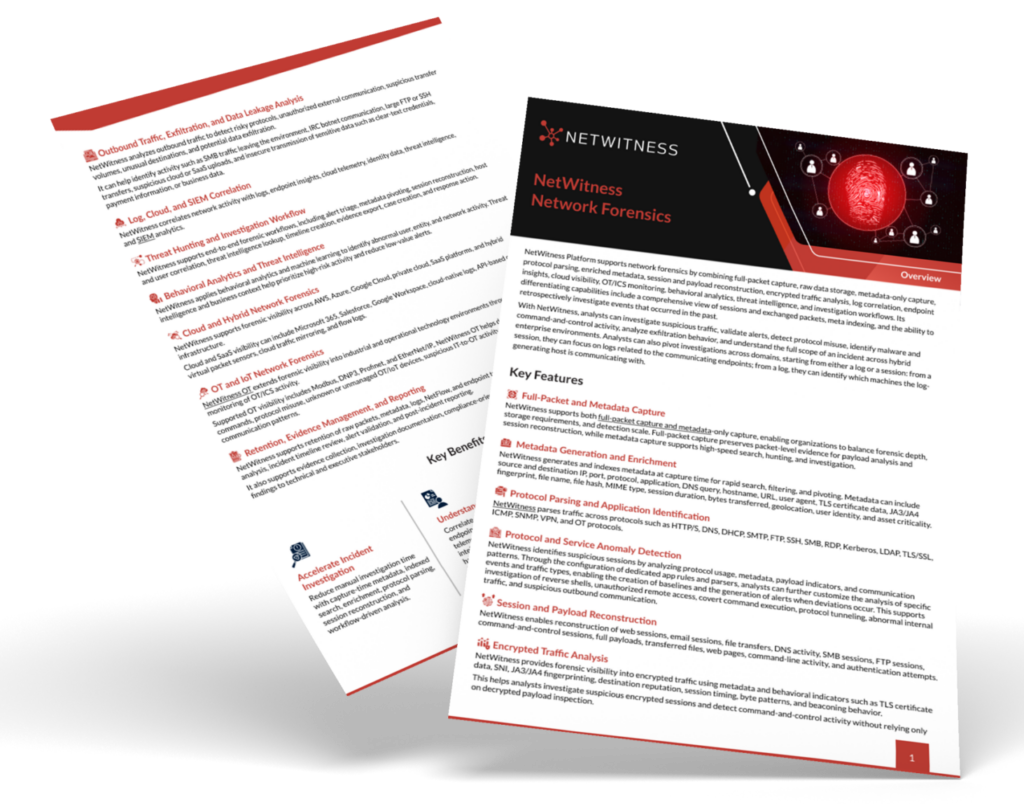
If you have gaps similar to those listed here, give NetWitness a try. It adds metadata when capturing the packets, analyzes encrypted traffic by using behavior, such as timing and beaconing, and enables analysts to look at events weeks ago over packets, logs, and endpoint data. It’s not a replacement for your gateway or DLP, but it will provide your DLP or gateway with something to work from.
Conclusion: Turning AI-Driven Traffic into Actionable Forensic Evidence
The habits developed to investigate AI traffic are outpaced by its growth. Maintain the correct data, add data as it flows in, use machine learning to process the volume, and let analysts do the judgment calls. Then add policy and content controls on top of that since forensics tells us what happened, but doesn’t tell us what is allowed.
Frequently Asked Questions
1. How is AI-driven traffic changing network forensics?
It adds volume and speed, and makes malicious activity resemble approved automation. Analysts need behavioral analysis and richer evidence to keep up.
2. What are the biggest network forensics challenges associated with AI-driven traffic?
Telling good automation from bad, handling volume and speed, tracing agent activity across environments, shadow AI, and sensitive data leaving through prompts.
3. How does generative AI affect cyber threat investigations?
It makes automation cheaper, from agentic bots that scrape and attempt account takeover at scale to AI-written lures. Network data can’t always show how a lure was written, so investigators lean on behavior and evidence over static indicators.
4. How can forensic teams detect malicious AI-driven network activity?
Baseline normal behavior, watch for odd beaconing or destinations, correlate network and endpoint data, and keep packets to validate findings.
5. What role does machine learning play in network traffic analysis?
It learns normal patterns, flags deviations, links weak signals into one incident view, and helps cut false positives.
6. What tools can help analyze AI-driven network traffic?
Platforms combining full packet capture, metadata enrichment, behavioral analytics, and SIEM correlation, such as NetWitness, alongside DLP and web gateway controls.
Know What Happened. Take Control After a Breach.
- Identify the Initial Point of Compromise
- Uncover the Full Attack Scope
- Trace Attacker Movement
- Strengthen Incident Response