What is a whaling phishing attack?
A whaling phishing attack is a highly targeted phishing or business email compromise attempt aimed at senior executives or other high-authority employees. The goal is usually to steal credentials, hijack a session, or abuse executive trust to trigger approvals, payments, or access to sensitive data.
The CFO sees a familiar name, a familiar thread, and a request that sounds completely ordinary. The message references a real vendor, a real deadline, and language that matches the executive who supposedly sent it. By the time finance hesitates, the attacker is already inside the mailbox, reading context, choosing the right thread, and using executive trust as a business tool.
That is the real problem with whaling phishing. The hardest part does not begin when the message lands. It begins when the message is believed.
In 2025, the FBI’s Internet Crime Complaint Center logged 24,768 business email compromise complaints with more than $3.0 billion in reported losses.
For security leaders, the more useful question is no longer whether a whaling phishing attack can get through. The useful question is what happens next, what defenders should look for, and how phishing detection and response should unfold once an executive identity is in play.
Why Whaling Phishing Attacks Are More Dangerous Than Standard Phishing
Standard phishing usually scales by volume. Whaling Phishing scales by authority. When the compromised identity belongs to an executive, the attacker gains proximity to approvals, vendor conversations, finance workflows, legal threads, and the kind of urgency that employees rarely challenge.
NetWitness experts note that attackers with access to an email account can also reach connected mailbox content and cloud data, then use that account to send internally and externally.
That is why a whaling phishing attack often becomes a business email compromise problem before it looks like a classic email security event. In whaling cybersecurity, the real blast radius comes from misuse of authority inside trusted workflows, not just from the original lure. The damage can move from identity compromise to payment fraud, exposed conversations, and reputational fallout in a matter of hours.
What Happens After a Successful Whaling Phishing Attack
Credential capture, session hijacking, or direct account access
Some incidents still begin with basic credential theft, but the more dangerous path increasingly involves session hijacking. Microsoft’s 2026 research on the Tycoon2FA phishing-as-a-service platform said it enabled tens of millions of phishing messages each month across more than 500,000 organizations and warned that attackers can maintain access through stolen session cookies unless active sessions and tokens are explicitly revoked. That matters because a password reset alone may not end the incident.
Mailbox reconnaissance
Once inside, attackers usually do not rush. They search for valuable information such as invoice trails, vendor threads, calendars, approvals, and recent executive conversations to understand who can be influenced and which business processes can be abused with the least friction.
The executive identity becomes the weapon
This is where the incident shifts from compromise to manipulation. Attackers reply inside existing threads, imitate normal executive tone, and send credible requests to finance, procurement, executive assistants, HR, legal, or external vendors, depending on what the mailbox reveals.
Fraudulent approvals
The first fraudulent request is rarely the last. Once the attacker sees who responds quickly, the campaign broadens. Payment changes, wire approvals, payroll redirection, sensitive document requests, and urgent follow-ups to vendors or partners all become possible because the executive mailbox provides both credibility and context.
Persistence
Forwarding rules, hidden inbox rules, newly approved applications, suspicious MFA changes, and other account modifications often appear before the organization realizes the mailbox is being monitored. NetWitness experts suggest defenders to check for external forwarding, hidden inbox rules, suspicious signatures, messages in Sent or Deleted Items, consented applications, and changes to MFA devices or roles after a cloud email compromise.
How Security Teams Detect a Whaling Phishing Attack After the Initial Compromise
Phishing detection and response often break down because teams keep looking at the message instead of the account. By the time a whaling phishing incident reaches the SOC, the decisive indicators are usually in authentication logs, MFA behavior, mailbox changes, outbound email activity, and finance workflow anomalies rather than in the original email alone.
Anomalous identity or login activity
Unexpected geographies, unusual IPs, odd login times, successful sign-ins after multiple failures, and sign-in patterns that do not match executive behavior are all high-value signals.
Suspicious MFA behavior
Executives who suddenly report repeated prompts, unexpected MFA registration activity, or strange sign-in prompts deserve immediate scrutiny. Microsoft’s phishing-resistant MFA guidance is blunt: SMS codes, email OTPs, and push notifications are becoming less effective against man-in-the-middle phishing and MFA fatigue, which is why phishing-resistant factors such as FIDO2 and passkeys are becoming the new baseline.
Unusual mailbox rules and outbound email patterns
Mailbox artifacts are often the clearest post-compromise evidence. Suspicious external forwarding, hidden inbox rules, unexpected signatures, messages in Sent or Deleted Items, and replies sent into threads the executive never touched are all classic warning signs.
Access to sensitive threads and financial workflows
Whaling detection is also a workflow problem. A sudden executive request to change banking details, rush a purchase, release payroll data, or move a confidential document should be treated as a security signal, not just a business exception.
Employee reports and signals from finance or procurement
Security teams do not always find these incidents first. Sometimes AP notices a strange tone. Sometimes a vendor calls back. Sometimes an executive assistant spots a reply that feels slightly wrong. That matters because Google Cloud’s 2025 M-Trends executive guidance said organizations first learned of malicious activity from an external entity 57% of the time, which is a strong reminder that finance teams, vendors, and employees are part of the detection layer whether the SOC plans for it or not.
Break down silos and accelerate investigations by connecting SIEM, NDR, and EDR into a single, intelligent workflow.
- Unified visibility across logs, endpoints, and network traffic
- Correlated insights to uncover multi-stage attacks faster
- Reduced alert fatigue with prioritized, high-fidelity alerts
- Seamless analyst workflows from detection to response
Immediate Phishing Incident Response Priorities
The first hour should be run like business-process containment, not mailbox cleanup. The organizations that handle a whaling phishing attack well understand that the executive identity is now a live fraud channel. Speed matters, but so does sequence.
Confirm what happened and how far it spread
The first task is scope. Responders need to determine whether the attacker used stolen credentials, an active session, malicious app consent, inbox rules, or some combination of those methods. Microsoft recommends reviewing sign-in logs, audit activity, applications with user consent, administrative role changes, mail forwarding, hidden inbox rules, and message trace to map both access and downstream messaging.
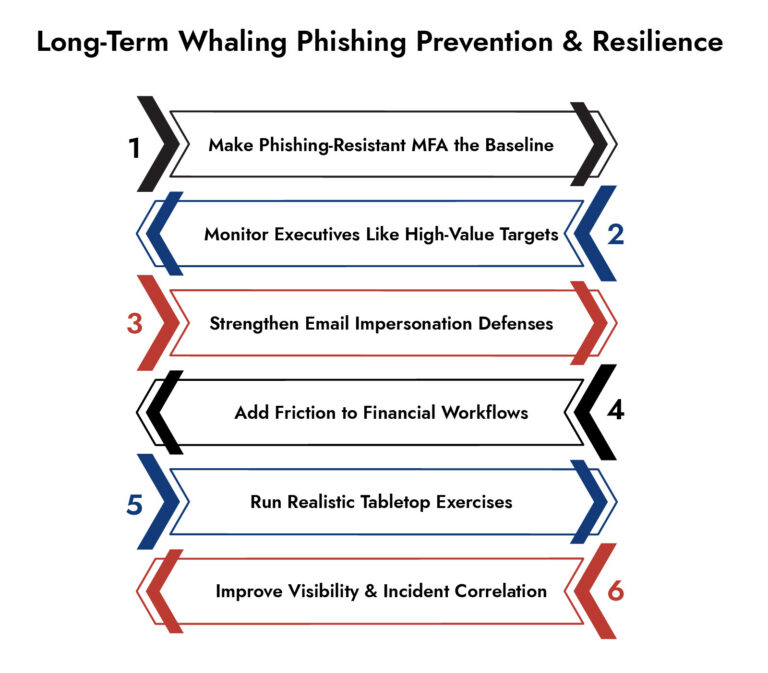
Contain the executive identity
If the account is still active, the incident is still unfolding. Microsoft’s guidance recommends revoking user access, revoking sign-in sessions, reviewing MFA devices, and investigating role or application changes as early containment steps. For a true executive mailbox compromise, that step should be treated as urgent because every minute of continued access preserves the attacker’s authority inside the organization.
Revoke sessions and remove persistence
This is where many teams lose time. Password resets matter, but session hijacking changes the response sequence. Microsoft’s Tycoon2FA analysis specifically warns that attackers can keep access after a password reset if active sessions and tokens remain valid, while Microsoft’s response guidance directs defenders to remove suspicious forwarders, hidden rules, and other persistence artifacts.
Alert likely downstream targets
Finance, procurement, payroll, legal, executive assistants, and vendor-facing teams should be warned immediately if the mailbox may have been used for impersonation. FBI BEC guidance recommends verifying payment and purchase requests through an independent channel, especially when urgency or secrecy appears in the request. In practice, that means temporarily distrusting the mailbox until the organization has re-established a clean approval path.
Temporarily lock down risky approval and payment workflows
The first hour of phishing incident response is not complete until business workflows are protected. Wire approvals, bank-detail changes, gift-card requests, payroll changes, and urgent vendor actions should move to an out-of-band process until the incident is understood. That is a simple control, but it directly interrupts the fraud path that makes whaling phishing so expensive.
Preserve evidence and centralize incident handling
Mailbox cleanup can erase evidence if it happens before artifacts are collected. Message trace, audit events, sign-in logs, suspicious emails, mailbox rules, and related endpoint or network indicators should be preserved early. For organizations trying to improve cybersecurity incident management, platforms such as NetWitness can help collect and correlate that telemetry across multiple sources so investigators are not rebuilding the story by hand under pressure.
Containment and investigation
Containment stops the bleeding. Investigation explains the risk. After the executive identity is locked down, responders still need to answer several hard questions: what did the attacker access, what changed inside the account, who received fraudulent communications, and whether the incident expanded beyond the mailbox.
Mailbox artifacts
Mailbox artifacts often tell the clearest story. Hidden rules, external forwarders, odd folder moves, suspicious signatures, messages in Sent Items, unexplained messages in Deleted Items, and changes to account settings can all indicate surveillance or impersonation. Microsoft even recommends checking hidden inbox rules directly because they are a common persistence mechanism after cloud mailbox compromise.
Identity telemetry and token or session misuse
Investigators should assume the attacker may have used more than one access method. Sign-in logs may show suspicious IPs or geographies, while application consent, MFA device changes, and token reuse can point to deeper persistence. Microsoft’s Tycoon2FA research is especially relevant here because it ties stolen session cookies to continued access even after password changes unless session revocation is handled correctly.
Suspicious message traces and follow-on targeting
Message trace should be used to identify every internal and external recipient who received replies, approvals, or unusual requests from the compromised executive mailbox. It is also worth remembering that authentication checks do not solve every impersonation problem. Microsoft notes that lookalike domains can still pass SPF, DKIM, and DMARC, which is why executive impersonation controls and similar-domain detection matter during the investigative phase.
Evidence of broader compromise
A mailbox breach may not stay a mailbox breach. Microsoft’s cloud email account guidance notes that attackers with account access may also reach connected SharePoint and OneDrive content, which means investigators should verify whether the actor accessed sensitive documents, harvested contact data, or used executive context to target additional identities or workflows.
Business impact assessment
Impact assessment should go beyond the question of whether money moved. Security teams should document attempted fraud, exposed conversations, vendor impersonation, sensitive attachments accessed, and any downstream response required from legal, compliance, or affected business units. FBI loss data remains a useful reality check here: executive impersonation and BEC are still generating billions in reported losses, so declaring victory at “password reset complete” is not serious incident management.
Why NetWitness?
NetWitness Network Detection and Response (NDR) gives visibility into the network traffic to help uncover suspicious post-compromise activities such as anomalous outbound traffic, unusual cloud access, or attacker-controlled connections.
At the same time, NetWitness Endpoint Detection and Response (EDR) provides deeper insight into how the compromise occurred, identifying credential harvesting, suspicious processes, or signs of persistence on the user’s device.
Together, NetWitness solutions allow security teams to correlate identity, email, endpoint, and network signals, accelerating phishing detection and response while ensuring the attacker’s access is fully understood and removed.
Frequently Asked Questions
1. What are the best software tools to detect whaling phishing attacks?
There is no single best tool because whaling detection spans email security, identity telemetry, and post-compromise investigation. Solutions like NetWitness NDR and EDR help extend detection beyond the inbox by uncovering suspicious traffic, compromised sessions, and endpoint-level indicators, allowing security teams to correlate signals across identity, email, network, and device activity for faster, more complete phishing detection and response.
2. What is the primary difference between whaling and standard phishing attacks?
The primary difference is target and consequence. Standard phishing attacks are usually broader and lower-context, while whaling is aimed at high-authority individuals whose accounts and approvals sit inside critical business workflows. That makes whaling more likely to become executive impersonation, BEC, or downstream fraud after initial access.
3. How can I protect my small business from whaling phishing scams?
The practical starting point for a small business is tighter verification and stronger identity control. The most effective steps are phishing-resistant MFA where available, built-in spoofing and BEC protections in the email platform, strict review of mailbox forwarding and suspicious app consent, and an out-of-band callback process for payment changes or urgent financial requests.
Rolling the Dice: Ransomware in the Gaming Industry
Discover how ransomware attacks hit gaming companies, how attackers moved laterally, and why network visibility is key. Learn real-world lessons and strategies to detect, respond, and protect critical systems.