How does PCAP analysis improve high-severity alert investigations?
PCAP analysis gives investigators network evidence behind the alert.
It can help validate the triggering session, reconstruct protocol behavior, identify related communications, establish sequence and timing, and investigate what an affected host did before and after the detection.
Combined with metadata, endpoint and identity telemetry, this enables the SOC to move from “the alert is real” to “this is what the attacker did and these systems may be affected.”
A high-severity security alert rarely marks the moment an attack began. It marks the moment a particular detection rule, behavioral analytics, or threat model saw enough evidence to raise its hand.
If a SOC investigates only what happened at the alert timestamp, it can validate the detection and still miss the incident.
The attacker may have established an initial connection 20 minutes earlier. A compromised host may have been beaconing quietly for hours. Credentials may already have been used against internal systems. And by the time command-and-control activity crosses a detection threshold, lateral movement or data staging may already be underway.
Microsoft’s own alert-investigation guidance reflects this reality: its alert story presents related events and entities that occurred before and after the triggering activity, rather than treating one alert as the entire attack.
This is where PCAP analysis becomes valuable.
When full packet capture has been continuously collected and retained across the relevant network path, investigators can move backward and forward from the alert timestamp to reconstruct the surrounding network activity.
The operating principle is simple:
Detection tells you where to start. Reconstruction tells you what happened.
What is PCAP Analysis in a Security Investigation?
PCAP analysis is the examination of captured network packets to understand communications between systems. During an alert investigation, analysts can use PCAP data to validate the triggering session, investigate network activity that preceded it and follow subsequent communications to determine the scope and impact of an attack.
A PCAP file stores captured packet data so that traffic can be examined after it has crossed the network. Wireshark supports both the traditional pcap format and pcapng, its more extensible successor. A packet capture can preserve timestamps, captured packet lengths and the raw packet bytes needed for detailed protocol analysis.
But this article is not about learning Wireshark filters. For a modern SOC, the more important question is:
Can investigators use historical network evidence to reconstruct the attack sequence surrounding an important detection?
Role of Alert as the Anchor for Timeline Reconstruction
A high-severity alert is a pivot point, not an incident boundary
Consider an NDR or IDS alert generated at 14:32:
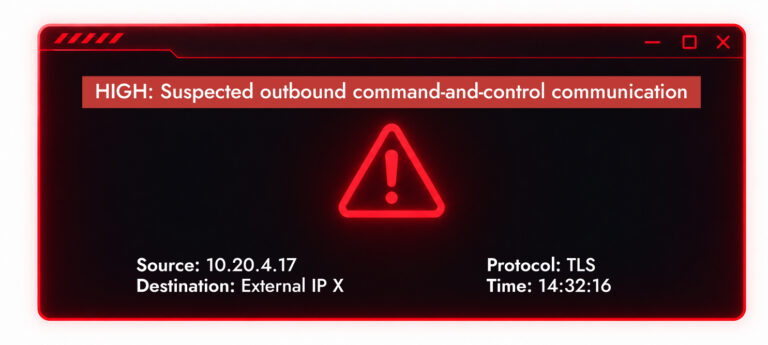
There are three different investigations hiding inside that one alert.
| Investigation window | Main question | What network evidence may reveal |
| Before the alert | How did we get here? | DNS activity, earlier connections, downloads, reconnaissance, first C2 contact, authentication activity, lateral movement, unusual protocol use |
| At the alert | What actually triggered the detection? | Exact session, source and destination, ports, protocol behavior, timing, request/response sequence, TLS characteristics and payload where readable |
| After the alert | What happened next? | Continued C2, internal movement, new affected systems, file transfers, staging, exfiltration or continued communication after containment |
That is the mental model SOC leaders should encourage.
How to Use PCAP Analysis to Reconstruct a High-Severity Alert
Start with the alert, but do not stop there
A high-severity alert gives the analyst an investigation anchor. Before opening raw packets, establish the facts already known:
- Alert timestamp and time zone
- Source and destination IP addresses
- Source and destination ports
- Transport and application protocols
- Affected asset
- Detection or analytic that fired
- Severity and confidence
- Associated user or identity, if known
- Session identifier or flow information, where available
- Related alerts or indicators
This first step matters because enterprise PCAP analysis for cybersecurity should not begin by dumping terabytes of network traffic onto an analyst. It should begin with context.
NetWitness implements this concept at an architectural level. Its Network Decoder captures packets, sessionizes and parses network activity, generates metadata, and writes session, metadata, and packet data to storage.
Analysts should not have to start every investigation by manually inspecting raw packets. Searchable metadata can identify the interesting sessions first. Packet-level evidence can then be used when the investigation requires deeper validation.
NetWitness describes the relationship in similar terms: metadata enables rapid search and correlation, while retained full packets provide deeper forensic evidence.
Investigate before the alert: find out how the activity started
Suppose the security team receives an alert at 14:32 for suspicious outbound C2 traffic from workstation A.
The obvious question is: What happened at 14:32?
The better questions are:
- When did this behavior actually begin?
- What happened to workstation A before the detection fired?
Start moving backward through retained network traffic analysis data and look for the first communication
Was 14:32 really the host’s first communication with the destination?
Search earlier network metadata and packet data for:
- The first observed session with that IP or domain
- Previous connections to related infrastructure
- DNS queries that resolved the destination
- Periodic low-volume connections
- Failed connection attempts
- Changes in destination ports or protocols
- Communications through proxies or intermediary infrastructure
A detection threshold can create an artificial beginning.
For example, an analytic might flag a beacon only after observing enough periodic connections to classify the pattern confidently. That does not mean the first malicious communication occurred when the alert appeared.
Follow the DNS trail
If the destination was reached by domain rather than hard-coded IP, DNS can provide valuable earlier context.
Investigators may ask:
- When was the suspicious domain first queried?
- Which host made the query?
- What addresses were returned?
- Did the domain resolve differently over time?
- Did other enterprise hosts query the same domain?
- Were unusual subdomains involved?
- Did DNS activity precede every suspicious network session?
Even where an application payload is encrypted, related DNS activity can help establish chronology.
Look for delivery or initial network activity
Depending on the intrusion path and available visibility, earlier packet capture analysis might expose:
- HTTP requests and responses
- Redirect chains
- File downloads
- Connections to newly observed infrastructure
- Suspicious user-agent behavior
- Protocol anomalies
- Unusual TLS certificate information
- Unexpected inbound or outbound services
The goal is not to assume the network contains evidence of initial access in every case. Phishing through a SaaS mail provider, removable media or an endpoint-only exploit may leave the decisive evidence elsewhere.
The goal is to determine what the network can prove.
Look inward, not only outward
Once a host appears compromised, the investigation should also cover earlier east-west traffic.
Look for communication involving:
- SMB
- RDP
- SSH
- Kerberos
- LDAP
- DNS
- File shares
- Remote administration services
- Other internal management protocols
NetWitness NDR monitors east-west communications and identifies suspicious internal movement, with metadata, behavioral analytics, and session reconstruction supporting lateral-movement investigations.
This is important because the destination named in the alert may not represent the attacker’s most consequential activity.
Investigate the alert itself: move from detection to evidence
Once the analyst understands the surrounding context, the triggering session becomes the forensic anchor.
NIST recommends beginning packet analysis with the individual sessions connected to the alert and identifying the five-tuple:
Source IP + Destination IP + Source Port + Destination Port + Protocol
From there, analysts can follow the TCP or UDP stream and examine the session in context.
Depending on the protocol, capture point and encryption state, pcap file analysis may expose evidence such as:
- HTTP methods, URLs, headers and response codes
- DNS queries and responses
- SMB activity
- FTP commands and transferred content
- Protocol misuse
- TLS handshake properties
- Certificate information
- Packet sizes and timing
- Session duration
- Client/server byte ratios
- Transferred objects
- Plaintext attacker commands
- Payload contents when those contents are available to inspection
MITRE ATT&CK formally separates Network Traffic Content from Network Traffic Flow. Traffic content includes full packet or session data containing protocol headers and payload content, enabling deeper protocol inspection, payload decoding and forensic investigation. Flow data provides summarized session characteristics such as addresses, ports, timestamps and volumes without retaining complete payloads.
That distinction matters operationally.
Flow or metadata may tell you:
10.20.4.17 communicated with destination X over TCP/443 for 42 seconds and transmitted Y bytes.
Full packet evidence may allow you to go deeper:
- What protocol behavior occurred inside that conversation?
- Was something downloaded or uploaded?
- Did the server return commands?
- Was the protocol being abused?
- Does the actual session support the detection?
This is where a SOC moves from alert acceptance to alert validation.
Investigate after the alert: determine the blast radius
Confirming a high-severity detection should not be the end of the workflow. It should change the question.
Before validation: Is the alert real?
After validation: How far did the attacker get?
Move forward from the alert timestamp.
Look for:
- Continued connections to the same C2 infrastructure
- Connections to new C2 destinations
- Changes in beacon frequency
- Additional commands or responses
- New DNS queries
- Internal reconnaissance
- SMB, RDP, SSH or administrative traffic
- Connections to domain controllers or critical servers
- Sudden increases in outbound traffic
- Large transfers or unusual byte ratios
- File staging activity visible on the network
- Other hosts communicating with the same infrastructure
- Communications that continue after containment
MITRE’s detection strategy for Exfiltration Over C2 Channel (T1041) explicitly includes network traffic content and PCAP/flow analysis among the data sources that can support investigation of suspicious outbound payloads.
The important part for leadership is that this changes the operational outcome of the investigation. A SOC that stops after validating the first C2 alert may record:
True positive. Compromised workstation isolated.
A SOC that reconstructs subsequent activity might discover: Compromised workstation contacted three internal servers, accessed a file share and subsequently transferred a large volume of data externally.
Build the timeline across metadata, sessions, packets and endpoint evidence
PCAP should not be positioned as an answer to every forensic question. It is one evidence layer.
A useful investigation model is:
Detection → Metadata → Session → Packet → Endpoint/Identity Context → Timeline
Suppose PCAP shows: Host A initiated an SMB session with Host B at 10:52.
That is meaningful network evidence. It may not establish:
powershell.exe initiated the connection after the attacker used a particular employee’s stolen credentials.
That conclusion could require:
- EDR process telemetry
- Windows security events
- Kerberos or identity logs
- Active Directory events
- Process ancestry
- Authentication records
- Cloud identity telemetry
- SIEM correlation
The strongest incident timeline connects those sources rather than forcing one telemetry type to answer questions it cannot reliably answer.
NetWitness’ network forensics positioning combines packet capture, metadata enrichment, protocol parsing, session reconstruction, behavioral analytics, threat intelligence, and cross-domain correlation. NetWitness provides unified correlation across network, endpoint, cloud, and other telemetry.
For a security leader, this matters more than whether a platform can display hexadecimal packet contents.
The procurement question should be:
How quickly can my team move from a high-risk detection to a defensible explanation of what happened across the environment?
When Investigations Get Tough, Every Packet Matters
- Capture Complete Network Evidence
- Uncover Hidden Threat Activity
- Reconstruct Attacker Sessions
- Resolve Investigation Blind Spots
How NetWitness Turns Packet Data into Attack Reconstruction
This is where NetWitness should be differentiated from a standalone packet analyzer. Wireshark is extremely capable at opening a pcap file, filtering packets, dissecting protocols and following individual streams.
That is not the same enterprise problem NetWitness is trying to solve. NetWitness NDR combines several stages of the investigation workflow.
- Capture and sessionize network traffic
The NetWitness Decoder captures network packets, builds sessions, parses those sessions and stores packet and session information.
- Extract and enrich metadata
During parsing, network activity is converted into structured metadata that can describe elements such as IP addresses, applications, DNS activity, certificates and other protocol characteristics.
NetWitness emphasizes that this metadata is generated at capture time so analysts can search and filter network activity without manually reviewing each packet.
- Aggregate and index at enterprise scale
Concentrators aggregate metadata from Decoders and maintain data structures needed for interactive investigation. Brokers can federate queries across multiple Concentrators, creating a broader investigative view across collection points.
For distributed organizations, that is a material distinction from loading individual capture files into a desktop analyzer.
- Detect suspicious behavior
NetWitness combines network telemetry with behavioral analytics and threat intelligence to identify suspicious activity such as anomalous communications, C2 patterns and lateral movement.
- Reconstruct the session
Once a session becomes relevant, built-in network-forensics capabilities support full session reconstruction so the analyst can examine the communication in context rather than treating the detection as an isolated event.
- Move through historical activity
NetWitness’ investigation workflow for retrospective analysis of historical network data allows an analyst to follow related activity across time rather than limiting investigation to the packet or event that initially triggered the alert.
- Correlate across other telemetry
Network evidence becomes more useful when analysts can connect it with endpoint, logs, cloud, and identity-related information. NetWitness’ broader threat detection and response platform is designed around this cross-domain correlation.
From alert validation to attack reconstruction
High-severity alerts are not complete histories. An alert may identify the session that crossed a detection threshold without showing the reconnaissance that preceded it, the first C2 connection that established it, the lateral movement that followed it or the data transfer that determined the eventual business impact.
That is why the alert timestamp should be treated as an investigative pivot point rather than an incident boundary. That is the real value of PCAP analysis for cybersecurity:
not staring at packets for their own sake, but preserving enough network history to answer a much more important question after a serious alert:
What actually happened?
Frequently Asked Questions
1. What are the top rated software tools for analyzing network packet captures?
There is no single universally “top-rated” PCAP analysis tool because the right choice depends on the job.
NetWitness NDR is designed for enterprise network threat detection and forensic investigation, combining full packet capture, metadata enrichment, behavioral detection, historical investigation and session reconstruction.
Wireshark is one of the most widely used tools for detailed interactive packet and protocol analysis and supports pcap and pcapng files.
Arkime provides searchable session metadata, packet storage, timeline searching and PCAP export for larger network-data environments.
Security Onion combines alerts, hunting and access to retained full packet capture, allowing analysts to pivot from a security event to the associated stream.
Zeek is particularly useful for turning network activity into high-fidelity transaction logs and structured data for security monitoring and investigation rather than serving primarily as an interactive packet viewer.
The choice is therefore less about finding one “best PCAP tool” and more about matching the platform to the scale and purpose of the investigation.
2. How to analyze pcap files for network troubleshooting?
To analyze PCAP files for troubleshooting, begin with the affected hosts and time range, then isolate the relevant protocol or conversation. Review connection establishment, retransmissions, resets, latency, DNS responses and application behavior. Wireshark can isolate and follow individual TCP, UDP, TLS, HTTP and other supported streams so the exchange can be viewed chronologically.
Security investigations use many of the same packet-analysis techniques, but extend the scope into historical activity, related hosts and attacker behavior.
3. Why should security teams analyze PCAP data before a high-severity alert?
Because the alert may represent the point at which suspicious behavior became detectable, not when the malicious activity began.
Earlier PCAP and network metadata may expose DNS requests, initial connections, reconnaissance, downloads, low-volume C2, authentication traffic or lateral movement that provides the context needed to understand why the detection occurred.
Without retained historical traffic, those preceding network events cannot simply be recreated after the incident.
4. Can PCAP analysis help investigate ransomware attacks?
Yes. PCAP analysis can contribute to ransomware investigations by helping identify network activity associated with initial communications, C2, reconnaissance, lateral movement, remote administration, file-share access and possible exfiltration.
However, it should be correlated with endpoint and identity evidence. PCAP may show an infected device communicating with another host over SMB, for example, while endpoint telemetry may be necessary to identify the process responsible for that communication.
5. How to visualize network traffic using PCAP analysis software?
PCAP analysis software can visualize traffic through timelines, conversations, protocol hierarchies, endpoints, packet distributions and session views.
Wireshark provides detailed packet and stream views, while platforms such as Arkime add searchable session timelines. Enterprise network-forensics platforms such as NetWitness use extracted metadata and sessionized network activity to help analysts move from broader network patterns to the individual communications requiring deeper reconstruction.
For incident response, the most valuable visualization is often a chronological attack timeline showing activity before, at, and after the original alert.
Learn why full packet capture is critical for modern threat detection and faster incident response.
Inside you’ll find:
- Clear guidance on where log-driven security falls short
- Ways to uncover threats hidden in network traffic
- How to reconstruct attacks from end to end
- Practical insight to investigate incidents with packet-level proof