Your detection stack is working. That is the problem.
Every rule that fires adds to a queue that only grows. Many alerts get a glance. Some get none. Playbooks cover the cases someone predicted, so the odd alert at 2 a.m. lands on an analyst with no script. Even when an analyst reaches one, most of the time goes on translation: who is this user, what is this host, has this happened before? The judgment is the short part.
Most security AI is guessing from alerts. An alert is a short summary of something a rule already noticed, and reasoning over a summary gets you a confident guess you can’t check.
What a SOC needs is an AI that sees the whole network, works through every alert the way a good analyst would, shows its evidence and leaves the decisions that change your environment to you. That is NetWitness 12.6.
What is NetWitness 12.6?
NetWitness 12.6 puts AI to work across the NetWitness platform: on the wire, in the SOC and in the analyst’s day. It sees the whole network, investigates in seconds and proposes the response, with your data and your decisions under your control.
Autonomous AI Investigations. Human-Controlled Decisions. Smarter SOC s.
Three things set it apart:
- AI on full-fidelity data. NetWitness AI works on logs and packets, not just alerts, so its answers trace back to the actual traffic.
- Autonomy with control. You set the guardrails and choose how far automation goes. By default, every response action, whether proposed by Shilo or run by a playbook, waits for human approval. Your autonomy policy decides where automation is allowed, within platform guardrails that can’t be switched off.
- Built for regulated and critical environments. FIPS 140-3, Common Criteria EAL2 evaluation with Leidos, cloud or on-prem deployment, and a growing focus on OT.
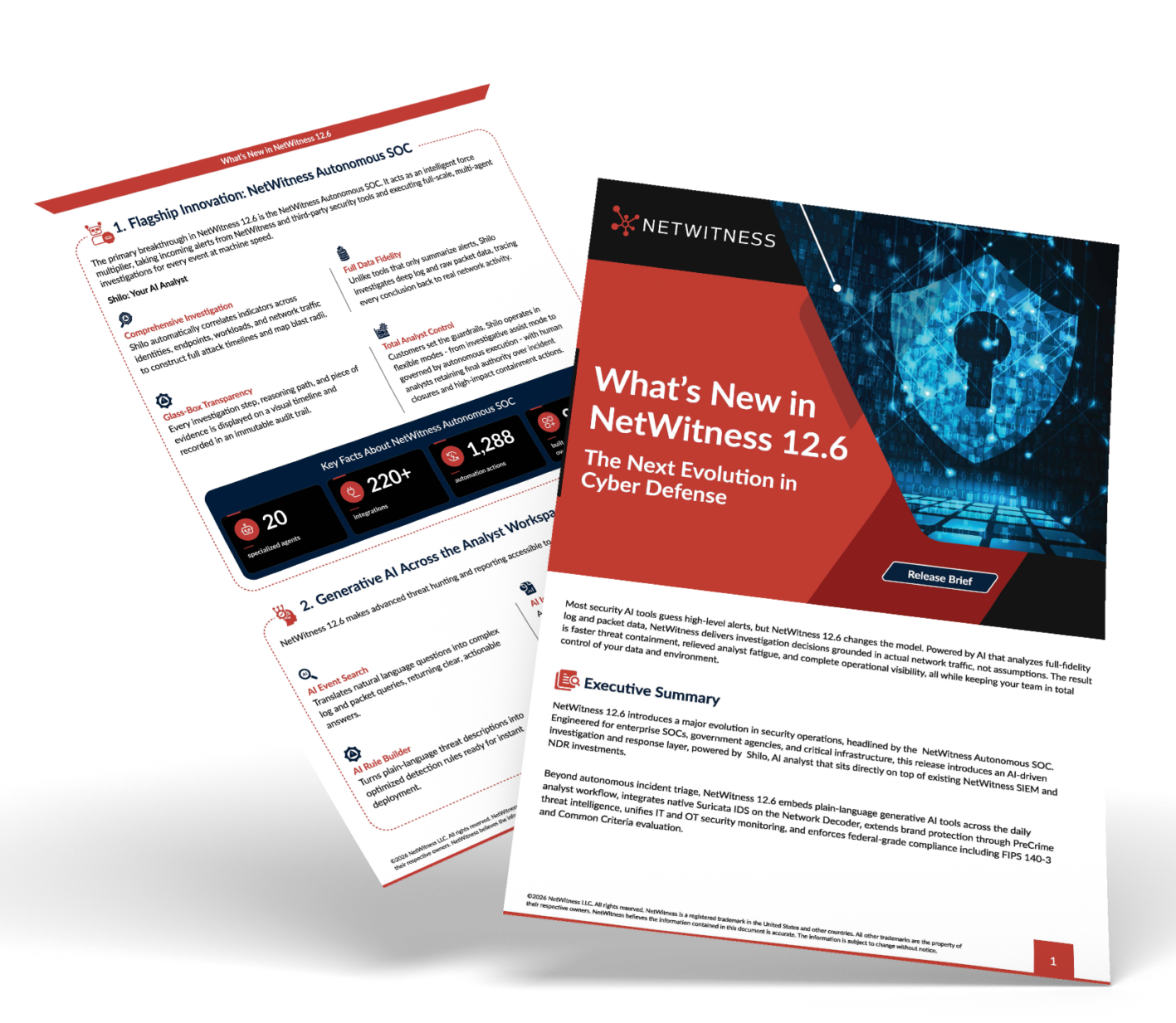
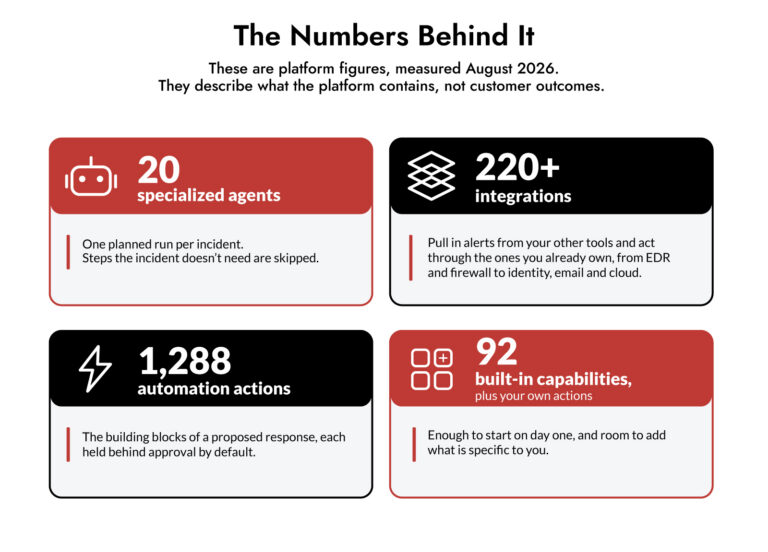
At the center is NetWitness Autonomous SOC, the investigation and response layer on top of NetWitness SIEM and NDR. Shilo, its AI analyst, triages and investigates every incident your rules send it, reaches a verdict with its own confidence level and drafts the response from the tools you already own. Detection stays with NetWitness, and your analysts stay in charge: people approve, decide and close.
Key Capabilities of NetWitness 12.6
- Autonomous SOC. AI agents investigate and prioritise every alert, map the blast radius across identities, devices, and workloads, to propose a response within limits you define. Supports on-premises and air-gapped environments, with cloud deployment available where required.
- AI across the analyst workflow. Ask in plain language and NetWitness writes the query, the rule and the report. AI Event Search, AI Rule Builder and AI Incident Reports, with MITRE ATT&CK and known-exploited CVE context, let junior analysts work like senior ones.
- Detection that sees more. Suricata IDS runs on the Network Decoder as a second engine on the wire, with no extra sensor. PreCrime Threat Intelligence with BforeAI surfaces phishing and look-alike domains targeting your brands.
- IT and OT in one view. One platform for detection and response across both.
- A platform you can trust. Hardened for environments where security can’t be an afterthought.
What it is not matters too. It is not a SIEM or a detection engine, and it is not a replacement for your analysts. People approve, decide and close. Every step is recorded and can be replayed.
How NetWitness 12.6 works
Let’s break it down. Shilo runs five steps on every incident it takes, and stops at the point where something would change your environment. There, a person decides.
- Ingest. NetWitness incidents and alerts, plus alerts from your other tools, arrive in one standard shape. Known formats are parsed by rules, not guessed at by AI.
- Understand. Shilo plans a run across specialised agents: extract the indicators, resolve the entities, enrich, classify, analyse. It lands on a verdict with a self-scored confidence. When the evidence is thin, it escalates instead of guessing.
- Decide. Autonomy rules set which incidents Shilo takes end to end. Approval gates set which actions need a person. Confidence alone never authorises an action.
- Act. The proposed response, such as isolating a host, disabling an account or blocking an address, is built from your own connected tools. It waits in the Action Center with Shilo’s reasoning. An approval nobody answers expires and never runs.
- Learn. Analyst feedback and outcomes shape later runs. Memory belongs to your tenant, is never shared with other customers and is never used to train a model.
You can watch every step live on a timeline, and each case carries a receipt of which sources contributed. Your analyst gets a case ready for a decision: verdict, confidence, plain-language analysis, evidence, proposed response and an owner. They review the reasoning instead of redoing the investigation.

NetWitness 12.6 Use Cases
NetWitness 12.6 works across the whole investigation, from the first alert to the audit that follows it. These are the five places teams feel it most. Each describes how the product is meant to be used.
- Autonomous SOC: From first alert to containment, with analysts in control
The SOC problem is rarely a shortage of alerts. It is a shortage of time to investigate them. Autonomous SOC puts Shilo, the AI analyst, between your detection and your analysts. From the first alert, AI agents investigate and prioritise every incident your rules send, map the blast radius across identities, devices and workloads, and draft the response from tools you already own. Shilo reaches a verdict with a confidence score it assigns itself, so the analyst opens a case that is already worked instead of an alert that is still raw.
Control stays with your team. Out of the box, every response action waits for a person to approve it, and an approval nobody answers expires and never runs. Your autonomy policy decides where automation is allowed, within guardrails that can’t be switched off, and you can start narrow, with high-severity incidents, then widen as trust grows. When the evidence is thin, Shilo escalates with its reasoning instead of guessing. It runs in the cloud or on-prem, and every step is on the timeline for review.
- AI-powered analyst productivity: Junior analysts working like senior ones
A surprising amount of analyst time goes on mechanics: writing the query, drafting the rule, assembling the report. Junior analysts wait on seniors for all three. With AI across the analyst workflow, they ask in plain language and NetWitness does the mechanics. AI Event Search writes the query, AI Rule Builder drafts the detection rule, and AI Incident Reports writes up the case with MITRE ATT&CK and known-exploited CVE context.
Because these tools work on logs and packets, not just alerts, the answers trace back to real traffic, and the analyst can check the work before relying on it. Co-Analyst chat adds plain-language questions about a case or the wider environment. The point is leverage, not replacement. The analyst still frames the question and makes the call, and a newer team member reaches the right answer without waiting for a senior.
- Detection that sees more: Identify attacks before they strike
Detection is only as good as what it can see. NetWitness 12.6 adds a second engine on the wire: Suricata IDS runs on the Network Decoder, so network traffic is inspected by a second detection engine with no extra sensor to deploy. Visibility also reaches beyond your perimeter. PreCrime Threat Intelligence with BforeAI surfaces phishing and look-alike domains that target your brands, so your team can see a campaign being built against you.
Together they move detection earlier in the attack: a second engine on what crosses the wire, and early warning of what is being staged outside it. One caveat is worth stating. PreCrime tells you what is being set up against your brands. It does not tell you that you have been compromised, so treat it as early warning and let your analysts decide what to block.
- Built for critical and regulated environments: Security that stands up to audit
Regulated teams need three things from any AI in the SOC: proof the platform is hardened, a record of who decided what, and clarity on where data lives. NetWitness answers the first with FIPS 140-3 and a Common Criteria EAL2 evaluation with Leidos. It answers the second with a glass-box investigation: every step appears on a timeline and can be replayed, decisions and approvals are recorded, and an approval that runs out of time is recorded as expired. Destructive actions always need approval, and actions with global scope never run automatically.
The third answer is deployment. Run it in the cloud or as an on-prem appliance, where alerts and incidents stay on your infrastructure and the connection is outbound-only, with no inbound ports. Be precise with your auditors: Shilo’s reasoning and working data are handled centrally in the platform cloud today, in-region reasoning is on the roadmap, and fully air-gapped deployment is scoped per engagement and is not available yet. Attestation scope is set out in the Trust and Security Pack, so check it there rather than from memory.
- IT and OT in one view: One investigation across both worlds
IT and operational technology are usually watched by different tools and different teams, so an attack that crosses from the corporate network into the plant shows up as two unrelated alerts. NetWitness gives you one platform for detection and response across IT and OT, so the crossing becomes one story and one investigation instead of two.
OT is a growing focus for NetWitness, so confirm with your NetWitness team which environments and protocols are in scope for your estate. The guardrails matter even more here. Actions that change the environment need approval by default, destructive actions always need approval, and your autonomy policy sets how far automation is allowed to go. In an environment where a wrong move has physical consequences, that is the point.
Experience NetWitness 12.6 Firsthand
Every SOC has the same three problems: too many alerts, a long tail with no script, and analysts spending their day translating. NetWitness 12.6 investigates every incident you send it, shows its work, and leaves every change to you.
Want to Explore NetWitness 12.6 Further?
Contact our team to see how NetWitness 12.6 can help your SOC investigate threats, reduce analyst workload, and accelerate incident response. Contact us to learn more or book a demo.
Is Your SOC Ready for the Next Evolution in Cyber Defense?
Download our free SOC Modernization Readiness Checklist to identify operational gaps, evaluate AI-driven security capabilities, and discover opportunities to improve threat detection and investigation.