What is a phishing attack?
A phishing attack is when someone impersonates a trusted person, organization, or service to trick a person into clicking a malicious link or installing something harmful. The term is a loose play on ‘fishing,‘ which involves casting a lure and waiting. The mechanics of phishing do vary, but the underlying approach is always deception.
Most people who get phished are not careless. They are busy. Imagine having back-to-back calls from 9 AM. 41 unread emails. A Slack thread you still have not responded to since yesterday. And then an email from IT Support, amongst 47 other unread emails, with a subject line: Action Required: Your Password Expires in 24 Hours.
The page it links to looks exactly right. You type your credentials and move on. What you don’t know is that the password now belongs to someone else. That evening, they were reading your email. By the next morning, they’ve found the thread between you and finance. By the end of the week, your organization’s payroll deposit account will have been quietly updated.
This is a pattern that incident response teams see regularly, and it almost always starts with one ordinary, unremarkable email. According to IBM’s Cost of a Data Breach Report 2025, 16% of breaches reportedly involved attackers using AI, often used in phishing and deepfake attacks.
Why Phishing Still Works in Modern Workplaces
If you think, ‘Our employees know what phishing looks like.’ And they might, for the phishing of five years ago. The problem is that the attacks have moved on.
1. AI-written emails are harder to spot
Attackers now use generative AI tools to craft phishing emails. They produce emails that are grammatically correct, convincing, and personalized. They use AI in cybersecurity to research online presence before they write a single word. The days of spotting a phishing email by its broken English are largely over.
2. Distributed teams have got the guards down
In an office, you could walk over and ask someone if they really sent that. In a hybrid team, communication happens mostly over email. Nobody thinks twice about receiving a message from a colleague they haven’t physically spoken to in weeks.
3. The volume problem
When you’re processing fifty emails a day, you’re not very attentive. Attackers know this, too. They design messages specifically to exploit cognitive overload: expiring deadlines, account warnings, urgent approvals. The goal isn’t to craft a perfect forgery. The goal is to get you to act before you’ve thought.
4. Social engineering exploits trust
At its core, phishing is social engineering. It works by exploiting the same instincts that make us functional humans. Social engineering in cybersecurity has been documented for decades precisely because no firewall blocks trust.
As per Verizon’s 2024 Data Breach Investigations Report, over 68% of breaches involved a non-malicious human element, including falling for social engineering attacks.
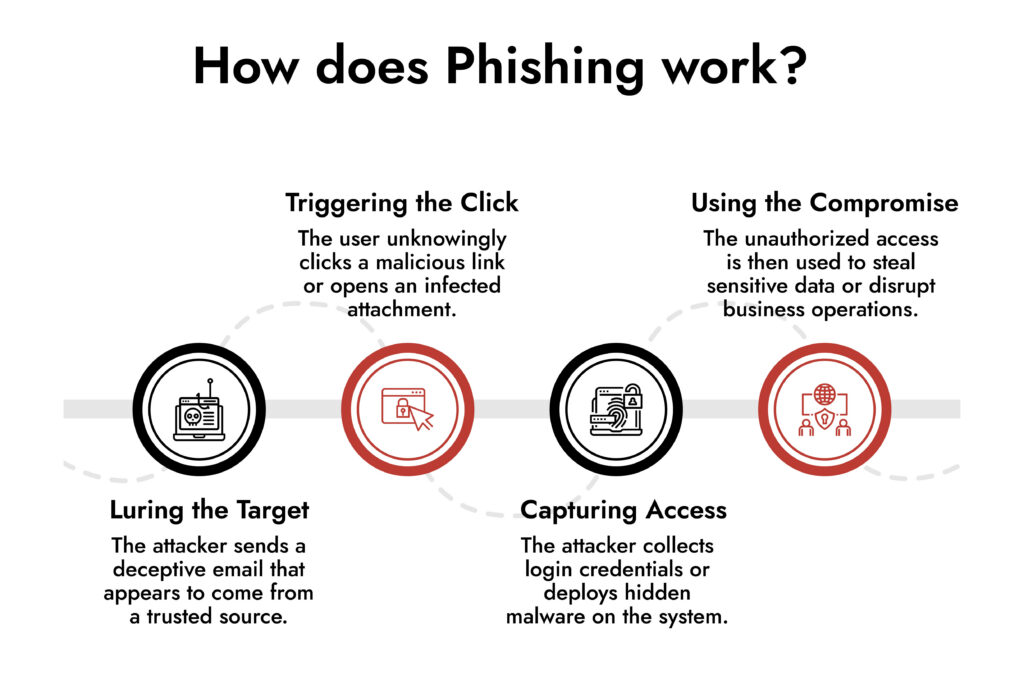
How does Phishing Work?
- Luring the Target – The attacker sends a deceptive email that appears to come from a trusted source.
- Triggering the Click – The user unknowingly clicks a malicious link or opens an infected attachment.
- Capturing Access – The attacker collects login credentials or deploys hidden malware on the system.
- Using the Compromise – The unauthorized access is then used to steal sensitive data or disrupt business operations.
10 Phishing Red Flags Worth Knowing
These aren’t theoretical. Each one maps a real attack pattern that shows up repeatedly across incident reports.
1. The urgency doesn’t match the situation
‘Your account will be suspended in 2 hours.’ ‘Immediate action required.’ The only reason why these phrases work is that urgency reduces the likelihood of verifying or consulting someone.
If an email is demanding immediate action, take that as a cue to slow down. An actual emergency rarely gets resolved by clicking a link in an email.
2. The sender address is almost right
[email protected]. The email ID has zero, not an ‘o.’ Attackers register domains that look right at a glance. Most people read the display name in their email client and not the actual sending address.
- Get into the habit of expanding.
- Look at the domain it’s actually coming from.
- If it doesn’t match exactly, treat it with suspicion.
3. Hover over that link before you click
The text of a link can say anything. ‘Click here to update your account’ might point to a completely different domain once you hover over it. This is one of the most basic email phishing indicators and also one of the most ignored. Before clicking any link in an unexpected email, hover and look at the actual URL that appears. If it doesn’t go where the link text implies, don’t go there.
4. Nobody legitimate asks for your password over email
This sounds obvious, but it still trips people up because the request is usually wrapped in legitimacy. ‘Confirm your banking details for expense reimbursement.’ ‘Re-enter your credentials to complete the security verification.’
Real internal systems don’t need you to input sensitive data through an email link. If you see this, navigate to the relevant platform directly and don’t use the link provided.
5. Your name isn’t in the greeting
‘Dear User.’ ‘Dear Valued Employee.’ If an email appears to come from your own HR team or IT department and they don’t know your name, that’s a phishing attack sign. Mass phishing campaigns can’t always personalize at scale. Your company’s internal systems know who you are.
A generic greeting doesn’t automatically mean phishing, but in combination with other red flags, it’s meaningful.

Phishing defense cannot rely solely on user vigilance or email filtering. What truly strengthens enterprise resilience is the ability to correlate identity anomalies, endpoint behaviour, and network traffic in near real time. When SOC teams can observe attacker movement immediately after initial access, containment becomes faster and business impact is significantly reduced.
— Ibrahim Badawi, Sales Engineer, NetWitness
6. You weren’t expecting that attachment
The attachment doesn’t have to look suspicious. An invoice, a contract, and a policy document are the things people open without thinking. Attackers know this. Hence, if you receive a file from someone you know but weren’t expecting it, verify through a separate channel before opening it. A quick message or call takes thirty seconds. A malware infection takes considerably longer to resolve.
7. You’re being asked to go around the normal process
‘Our payment portal is down. Please use the bank details in this email instead.’ ‘This is time-sensitive, don’t wait for the usual approval process.’ Bypassing process is a hallmark of social engineering security exploits. The entire point is to remove the safeguards.
If someone is asking you to do something in a non-standard way, that’s not a reason to move faster. It’s a reason to verify more carefully.
8. Something about the design is slightly off
Phishing pages and emails are copies, and copies always have tells. A slightly blurry logo. Font spacing that’s just wrong. A footer that references the wrong year. Your instincts often catch these before your conscious mind does.
If something feels slightly off about an email’s visual presentation, take a step back. Check the URL. Contact the sender through a known channel.
9. A security alert you didn’t trigger
‘We detected unusual activity on your account. Click to verify your identity immediately.’ This is one of the most effective lures because it triggers anxiety about your account security. Which is ironic, because clicking it is the thing that actually compromises your account. Go directly to the service’s website. Check your account there. Never use a link from an alert you weren’t expecting.
10. You’re being told to keep it quiet
‘Please don’t discuss this with anyone until the matter is resolved.’ Legitimate internal communications don’t come with secrecy clauses.
This instruction serves the attackers by preventing you from consulting a colleague who might immediately recognize the scam. If an email is asking you to keep the contents private, that’s a significant red flag. Loop in your security team immediately.
Four Phishing Scenarios That Actually Happen
These are a few examples that represent incident patterns security teams deal with regularly.
Payroll Diversion Fraud
An HR employee received a message that appeared to come from the company’s CFO. The tone was casual and familiar, exactly like the message you’d expect from a senior leader who’s in a hurry. It asked for payroll direct deposit details to be updated ‘before the next cycle’ for a vague but plausible reason. The message referenced a real internal project by name, which made it feel credible. The change was made. It took three pay cycles before the discrepancy was flagged, by which point the funds were gone.
Fake SharePoint Notification
A marketing employee got a standard-looking SharePoint notification saying a colleague had shared a campaign brief. The link that looked convincing went to an Office 365 login page. Credentials captured. The attacker was then using that inbox to send further phishing messages to external clients. The second wave was harder to contain.
Vendor Invoice with a Switched Digit
The finance team received an invoice from what looked like a known supplier. Same branding. Same kind of language. But the sending domain had one character changed that was easy to miss when you’re approving twenty invoices a week. The invoice referenced a real previous transaction and asked for updated bank details due to a ‘banking transition.’ The payment was processed. The legitimate vendor chased payment for weeks before anyone realized what had happened.
Collaboration Tool Impersonation
A Slack notification arrived in employees’ inboxes saying they’d been added to a new project channel. ‘Join Channel’ looked exactly like every other Slack notification they’d received. The link went to a credential harvesting page styled to match Microsoft’s login interface. The thing that made this one spread was precisely how routine it looked — nobody questioned a Slack notification during a busy period of project launches.
Phishing Doesn’t End at Your Inbox
The bigger problem about phishing is what happens after the initial compromise. Once an attacker has valid credentials, the threat stops being a phishing problem and becomes a network security problem. They’re inside. They’re behaving like a user. Standard defenses aren’t designed to catch them.
Here’s the truth about phishing prevention: awareness training reduces risk, it doesn’t eliminate it. People click things. That’s just reality. So, the organizations that weather phishing incidents better than others aren’t just training hard, they’re also running platforms like NetWitness® NDR that keep watching after the click happens. Unusual lateral movement, strange outbound traffic, and credential use at odd hours are what it catches, at the network level, before a single compromised login becomes something far worse.
Frequently Asked Questions
1. How does a phishing attack actually work?
Most phishing attacks are simpler than people expect. The attacker sends a message that appears legitimate and contains either a link to a fraudulent page designed to gather credentials or an attachment that installs malware when opened. Once they have access, they use it to move laterally through your organization’s systems, escalating privileges and looking for valuable data or financial controls.
2. What are the warning signs that an email might be phishing?
Urgency is the biggest one. If an email is pushing you to act immediately, that’s usually deliberate. Beyond that: check the actual sending domain, not just the display name. Hover over links before clicking. Be suspicious of any email asking you to enter credentials or share sensitive information. And if the greeting says “Dear User” from what’s supposed to be your own HR team. One red flag is rarely enough to be certain. It’s usually a combination.
3. What's the difference between spear phishing and regular phishing?
Regular phishing is a volume game. Same email, thousands of recipients, hoping enough people click. Spear phishing is the opposite; it targets only one account, researched carefully, with a message built around real details: your manager’s name, a project you’re working on, a vendor you actually use.
Whaling is the same thing, but aimed at executives, because they have the access and authority to approve big transactions. Targeted attacks work precisely because they don’t look like phishing.
4. What's the real business impact when phishing works?
The immediate impact of phishing is credential theft, unauthorized transactions, and data exfiltration. In the long term, phishing can lead to regulatory investigations, reputational damage, the cost of incident response, and, in ransomware cases, operational shutdown.
5. What is NDR, and how does it relate to phishing?
Network Detection and Response (NDR) is a security capability that monitors network traffic in real time to identify threats that have already made it past perimeter defenses. In the context of phishing, NDR helps detect the post-click activity such as unusual login patterns, lateral movement, and unexpected data transfers. It’s the layer of visibility that answers the question: ‘What happened after someone clicked?’