Why do attackers target different OSI layers?
Every OSI layer in the network model controls a different aspect of communication. It also has its own set of protocols and assumptions, therefore, vulnerabilities as well. Attackers target these vulnerabilities based on their objectives. Attackers target specific layers based on their objectives. For example, early-stage reconnaissance often happens at Layers 3 and 4.
When something is amiss on the SIEM dashboard, one of the first things that SOC experts check is: where in the stack is this happening? It is because modern attacks move through the different network layers OSI (Open System Interconnection) model, targeting the protocols and services that allow networks to communicate.
When the data is sent across a network, it passes through several OSI layers. Each layer adds its own header that guides the data to its destination. When the data reaches its destination, each layer removes the header and reads the information meant for it.
Since each layer assumes the data it is receiving is trustworthy, attackers often exploit this process. They manipulate the headers or the data inside them to hide malicious traffic or redirect communications.
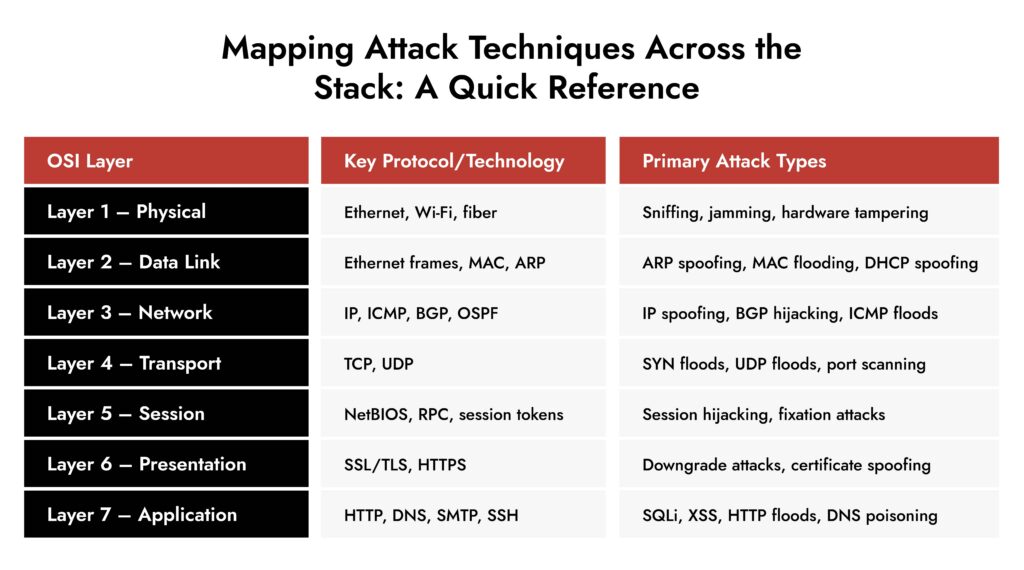
This post walks through each of the seven Network Layer OSI Model, the attacks most commonly associated with them, and what defenders should be paying attention to at each level. If you’re building detection logic, doing threat modeling, or just trying to get a cleaner picture of how cyber-attacks map to network architecture, this one’s for you.
7 Layers of the Network Layer OSI Model and their Common Attacks
The OSI framework is a universal reference model with 7 distinct layers, each responsible for a specific function in the network communication.
Layer 1 – Physical: Where Attacks Start Before the Packet Exists
The physical layer deals with the actual transmission of data through hardware such as cables, switches, and network interface cards. Most organizations do not pay much attention to the first layer, but in many intrusion scenarios, this is where things go wrong.
Common attacks at the physical layer:
- Sniffing: It is a type of passive interceptor attack, where a packet is designed just to listen to the shared networks, like hubs. Wireless networks without proper WPA3 or strong encryption, an attacker within signal range can capture raw frames.
- Signal jamming: An attacker floods a specific frequency band with enough noise to make it unusable, and devices that depend on that band simply go offline. IT security teams rarely think about this, but in OT and ICS environments where wireless sensors and controllers manage physical processes, an unexplained device dropout deserves more than a hardware investigation.
- Hardware tampering: This type of attack cannot be detected by any software because it happens below the OS. Rogue network taps, or hardware implants inserted at the physical level, intercept data way before their detection.
Layer 2 – Data Link: MAC Addresses and the Trust Problem
The second layer, Data Link, arranges the raw bits of data into frames and adds source and destination MAC addresses. MAC addresses, however, are not a strong authentication method as they were designed for trusted local environments.
Common attacks at the Data Link layer:
- ARP Spoofing (ARP Poisoning): This attack is executed by exploiting the Address Resolution Protocol (ARP), which is responsible for mapping IP addresses to MAC addresses. Attackers send forged ARP messages to link the MAC address to IP address of another device and manipulate the network. This is the foundation of most man-in-the-middle attacks at Layer 2.
- MAC Flooding: Switches map the MAC addresses to physical ports. The attackers overwhelm the switches with fake MAC addresses to fail-open. With this, the entire traffic is broadcast to all ports, allowing an attacker to capture traffic.
- DHCP Spoofing: A device connecting to a network blindly trusts whichever DHCP server responds first. That’s the problem. Drop a rogue server on the segment, win the response race, and suddenly you control what gateway and DNS server that device thinks it should be using. Traffic flows through your machine. The victim has no idea how the connection works; pages load, and nothing feels off. It’s a quiet attack that hands over a man-in-the-middle position without touching a single exploit.

The OSI model is your investigative compass in the SOC. Every packet you analyze, every rule you write, every pivot you make in a threat hunt maps back to a layer. The analysts who internalize this framework investigate faster and smarter.
For anyone coming through security training, mastering OSI is like knowing how a building is constructed before you start looking for structural weaknesses. The attackers already know the blueprint; the defenders need to know it better.”
— Dave Glover , Chief Customer Officer, NetWitness
Layer 3 – Network: Routing, IP, and the Manipulation of Paths
The network layer is crucial for network intrusion analysts as it handles logical addressing (IP addresses) and routing. Your firewall, IDS, and routing protocols are placed on this layer.
Common attacks on the Network layer:
- IP Spoofing: There’s no validation built into the source IP field of a packet header. It is editable, and attackers write whatever serves the attack. It helps them impersonate a user and gain massive inbound response volume. This is the first stage of Distributed Denial-of-Service (DDoS) attacks.
- BGP Hijacking (Route Hijacking): BGP routes traffic to ISPs and large networks. It was designed for a cooperative and non-malicious internet. In a BGP hijacking, a misconfigured router falsely announces malicious routes and the neigbors accept it without verification. As a result, the traffic is routed through the attacker’s network, where it can be disrupted or intercepted.
- ICMP-Based Attacks: Ping sweeps and traceroutes are standard network tools, which is exactly why they make good cover for early reconnaissance. An attacker mapping live hosts and network paths using ICMP blends right in with normal admin activity. On the other end of the spectrum, flooding a target with high-volume ICMP kills bandwidth without needing any vulnerability at all. Just volume.
- TTL Manipulation: The technique exploits the fact that a packet’s TTL decrements at every hop and an attacker who has mapped the network and knows where an IDS sits in the path can craft packets engineered to expire precisely at that sensor, while the payload has already been delivered to the target. The monitoring layer sees a dying packet and logs nothing meaningful.
Layer 4: Transport: TCP, UDP, and the Handshake That Can Be Weaponized
The transport layer manages communication sessions using TCP and UDP protocols. Both these protocols are exploited in cybersecurity.
Common attacks at the Transport layer:
- SYN Flood: TCP needs three steps before a connection is established: SYN, SYN-ACK, ACK. The server sets aside memory after step one, waiting for the client to finish. That waiting period is the problem. A massive volume of SYN packets with spoofed IPs are sent to use up the resources. After a point, real connections start getting refused. This is how DDoS is initiated in this layer.
- UDP Flood: No handshake, no state, nothing to slow it down — UDP is straightforward to flood by design. What makes it worth paying attention to beyond the obvious disruption is how it gets used as cover. A loud UDP flood pulls the operations team’s focus while something quieter runs in parallel. If a flood hits and everything else looks clean, that’s actually the time to look harder, not stand down.
- Port Scanning and Reconnaissance: Every targeted attack starts with someone figuring out what’s actually running in the environment. Port scanning is how that happens. A source IP hitting 400 ports in 30 seconds shows up in firewall logs and endpoint telemetry fairly clearly. What’s trickier is slow scanning, where probes are spread across hours or days to stay under threshold-based alerting. Either way, a single external IP systematically touching services it has no business touching is worth treating as pre-attack activity rather than background noise.
- Session Hijacking at the Transport Level: TCP sequence numbers keep data ordered and attributable within a stream. If those numbers can be predicted — and in some older or poorly implemented stacks they can — an attacker can inject packets into a live connection or kill it outright with a forged reset. The connection looks fine to both endpoints right up until data arrives out of sequence or drops without an obvious network reason.
Layer 5 – Session: Where Authentication and State Management Get Exploited
The session layer manages and maintains the sessions between applications. This layer is deeply intertwined with authentication systems, which makes it a valuable target.
Common attacks at the Session layer:
- Session Hijacking: Whenever a user authenticates themself, applications issue a cookie to represent them. Steal the cookie, skip the authentication entirely. Network interception, XSS, even a poorly secured device on shared Wi-Fi — there are several ways to get there. The credentials never get touched, which is partly why this doesn’t always trigger identity-based alerts.
- Session Fixation: Most hijacking attacks go after a session that already exists. Fixation flips that and the attacker plants the session ID before the victim even logs in. They push a known ID through a crafted link or redirect, the victim authenticates against it, and now the attacker holds a valid authenticated session they set up themselves. Applications that don’t regenerate session IDs post-login are wide open to this.
- Brute-Force Against Session Tokens: If session tokens are generated with weak entropy (short length, predictable values), an attacker can iterate through possible values to find a valid token.
Layer 6 – Presentation: Encryption, Encoding, and the Attacks That Abuse Them
This layer handles data formatting, encryption, compression, and encoding to ensure that data sent by one system can be understood by another. SSL/TLS operates here. So do format-specific attacks that leverage how data is parsed and decoded.
Common attacks at the Presentation layer:
- SSL/TLS Downgrade Attacks: Older security protocols like SSL and early versions of TLS have known weaknesses that the attackers take advantage of. Attackers perform a downgrade attack, where they trick a system into using an older, weaker security protocol during the connection process.
- Malicious Encoding and Format Exploits: The attack works because there’s a gap between what a security control inspects and what the application actually processes. A string passes through input validation looking harmless, then gets decoded or normalized downstream into something the filter never saw coming. Unicode normalization is a common vector; characters that appear identical can have different underlying representations, and systems that handle encoding inconsistently end up executing input they thought they’d already sanitized.
- Certificate-Based Attacks: TLS is only trustworthy if certificate validation is done properly. In environments with weak internal CA configurations or where clients accept certificates without fully verifying the chain, an attacker with a fake or fraudulent certificate can sit between client and server without either side flagging it.
FIN13: Inside a Fintech Cyber Attack
FIN13 is one of today’s most disruptive threat groups targeting fintech organizations with precision and persistence. This whitepaper breaks down their full attack chain—from reconnaissance and credential theft to lateral movement, data exfiltration, and evasion techniques. Gain insights into their TTPs, discover detection opportunities across the kill chain, and learn how NetWitness empowers faster response and mitigation.

Layer 7 – Application: The Widest Attack Surface
The application layer is the top of the OSI stack and the most visible to end users. This is where users and applications interact with the network. It’s also, unsurprisingly, where the majority of real-world attacks are concentrated. The application layer has the widest exposure because it’s intentionally accessible: you need users to reach it.
Common attacks at the Application layer:
- SQL Injection: When an application passes user-supplied input directly to a database query without proper sanitization, an attacker can modify the query’s logic to dump data, bypass authentication, or, in some cases, execute system commands.
- HTTP Floods (Layer 7 DDoS): Valid HTTP requests, proper headers, nothing obviously malformed is sent over the network. Each one hits the application stack, triggers database queries, spawns sessions, reads files. The server doesn’t get overwhelmed by packet volume, but gets buried under legitimate-looking work it can’t keep up with. Simple rate limiting doesn’t cut it here because the request rate per source often stays low. Behavioral baselines and request pattern analysis are what actually catch it.
- DNS Poisoning (Cache Poisoning): A fraudulent record gets injected into a resolver’s cache, and from that point, every user hitting that resolver gets directed to wherever the attacker wants. The browser shows the right URL, the padlock might even be there if the attacker has a valid certificate, and nothing looks wrong to the user. It’s one of those attacks that’s hard to detect at the endpoint level because the redirection happens before the connection is even established.
Why OSI Knowledge is Your Investigative Superpower
1. Layer Identification = Faster Triage
When an alert fires in your SIEM, knowing the OSI layer narrows your investigative path immediately. A lateral movement event smells like Layer 3/4. A C2 beacon buried in HTTPS traffic is a Layer 7 problem. With this, you’re pattern-matching against a known architecture.
2. Attack Chaining Across Layers
Most sophisticated attacks and especially APTs, span multiple layers. Let’s look at a real-world example:
- L2: ARP poisoning to position a MitM
- L4: TCP session hijacking to intercept traffic
- L7: Credential theft via intercepted HTTP session
If you only see the Layer 7 symptom (stolen creds), you might miss the Layer 2 root cause entirely. OSI awareness keeps you from treating the symptoms instead of the cause.
3. Log Source Alignment in SIEM
This is huge for the NetWitness world. Different log sources capture different layers:
- Firewall/IDS logs → L3/L4 (IPs, ports, flags)
- Proxy/web gateway logs → L7 (URLs, user agents, HTTP methods)
- Packet capture / NetWitness decoder → All layers (full fidelity)
- DNS logs → L7 but used to detect L3 exfiltration (DNS tunneling)
- NetFlow/IPFIX → L3/L4 behavioral patterns
Knowing which OSI layer your evidence lives on tells you exactly which log source to pivot to next.
4. Evasion Technique Recognition
Attackers know the OSI model too, and they exploit the seams between layers:
- IP fragmentation (L3) is used to bypass signature-based IDS
- TCP segmentation (L4) splits payloads to evade string matching
- HTTP chunked encoding (L7) hides malicious content in encoding
- HTTPS/TLS (L6) encrypts payloads to blind L7 inspection without decryption
Understanding the model means you can anticipate where adversaries will hide.
5. The NetWitness Decoder Connection
In NetWitness specifically, the packet decoder reconstructs sessions up the OSI stack: from raw frames (L1/L2) all the way to application payload (L7). When you’re building parsers, rules, or app rules, you’re essentially writing logic that targets a specific layer. If you don’t know the layer, you can’t write effective rules.
6. The IOC vs. EOC Lens
IOCs tend to be layer-specific artifacts — a malicious IP (L3), a known bad domain (L7), a C2 port (L4). EOCs (patterns of behavior) often cross layers — the chain from reconnaissance (L3 scan) → exploitation (L7 web attack) → exfiltration (L4/L7 tunneling). The OSI model is what lets you connect those dots across the stack when building your behavioral detection logic.
Practical Implications of the Network Layer OSI Model for Cyber Threat Management
Understanding cyber-attacks by the OSI layer has direct operational implications:
Detection: Knowing which layer an attack lives in tells you exactly where to look. ARP spoofing won’t show up in application logs. It shows up in switch telemetry and network flow data. SYN floods live in firewall statistics. SQL injection is in WAF and application logs. Without that layer mapping, detection coverage has gaps that nobody has formally accounted for.
Incident Response: When a breach gets reported, the instinct is to jump straight to the endpoint. The more disciplined approach is working through the stack to find where access first appeared, how the attacker moved laterally, and where the data leaves the environment. Each answer points to a different layer, and each layer points to different log sources. It keeps the investigation structured when things are moving fast.
Architecture Strengthening: Overlapping controls across layers is the whole point. A packet that slips past a perimeter firewall should still hit an IDS. Something that bypasses the IDS should encounter application-level controls. No single layer holds everything, and security architects who understand the OSI model build accordingly rather than stacking redundant tools at the same layer while leaving others completely exposed.
Conclusion
The OSI model isn’t something you learn once for a certification and forget. For anyone working in network security, it’s a daily working reference. Attackers don’t announce which layer they’re hitting — they use whatever angle gives them the best chance of success, often moving across layers as the attack progresses.
The teams that catch these attacks early are the ones who’ve internalized where different threats live in the stack, what signals to look for at each layer, and how to connect those signals into a coherent picture of what’s actually happening on the network.
Understanding cyber attacks by OSI layer isn’t theoretical — it’s the difference between seeing a SYN flood and also noticing the port scan that preceded it, and the application-level exploitation attempt that followed.
Frequently Asked Questions
1. What is the OSI model in cybersecurity?
The OSI model serves as a diagnostic and analytical tool in cybersecurity. It helps SOC teams to identify where in the network stack a threat, or vulnerability, or breach is occurring.
2. What are two services provided by the OSI network layer?
The network layer provides logical addressing and routing. Logical addressing means assigning IP addresses so devices can identify each other across networks. Routing is the process of finding the best path for packets to reach their destination, handled by protocols like OSPF, BGP, and RIP.
3. What does the network layer do in the OSI model?
It is the layer that moves data from one place to another. In other words, it allows data to travel from your machine to a server on the other side of the world.
Network Visibility Readiness Guide
Discover how to identify blind spots, monitor traffic across cloud and on-prem environments, and strengthen detection with a practical 7-step evaluation framework. Download the guide to improve investigation speed and security clarity.