How does ransomware spread and impact a business?
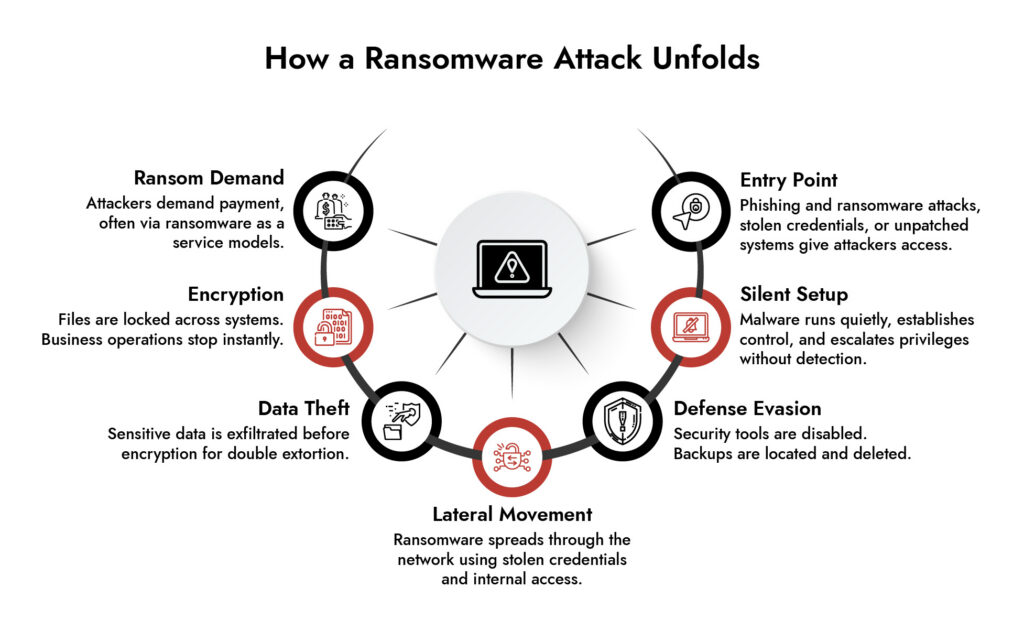
Ransomware spreads by exploiting human and system weaknesses, most commonly through phishing and ransomware attacks, compromised credentials, or unpatched software. Once inside, it moves laterally across the network, escalating access and infecting multiple systems in minutes.
This rapid ransomware process can shut down operations, lock critical data, and disrupt revenue. In advanced cases like a Medusa ransomware phishing campaign or ransomware as a service attack, businesses face not just encryption but also data theft and extortion.
Without strong protection from ransomware attack strategies, even a single-entry point can lead to full-scale business disruption.
Introduction
There’s a break-in happening right now on your network. You just don’t know it yet.
That’s not dramatic framing that’s the actual design of a modern ransomware attack. The encryption you eventually see on your screen, the ransom note, the countdown timer? That’s the last thirty minutes of an operation that’s been running silently inside your infrastructure for weeks. By the time anything looks wrong, the attacker has already read your backup schedule, mapped every file server, and delete your recovery options.
Understanding how does ransomware works really works, not the headline version is the difference between building a defense that holds and one that looks good on paper until it doesn’t.
What Is Ransomware?
Ransomware is malicious software that encrypts a victim’s files and demands payment almost always in cryptocurrency in exchange for the decryption key. The ransom itself can range from a few hundred dollars to tens of millions, depending on the target. What makes it uniquely destructive is that even after paying, there’s no guarantee you get your files back. And increasingly, paying doesn’t make the threat go away; it signals attackers that you’re willing to pay again. To understand how does ransomware work, you need to look beyond encryption and examine the full attack lifecycle
44% of data breaches involve ransomware | $57 billion estimated annual global ransomware damages | 80% of organizations that pay are attacked again within 12 months | 15 organizations become ransomware victims every day | 63% |
How Does Ransomware Work?
Ransomware is a type of malware that compromises a computer or network, gains access to files and systems, and then prevents users from accessing their data, typically by encrypting it. A ransomware attack usually involves several stages, from the initial compromise and execution to privilege escalation, lateral movement, data theft, and encryption. Understanding the ransomware process helps security teams identify suspicious activity before the ransomware encryption process begins and disrupt an attack before widespread damage occurs.
7 Steps of a Ransomware Attack
While individual ransomware families use different techniques, most attacks follow a similar sequence. These ransomware steps show how an attack can progress from initial access to encryption and extortion.
Step 1: Initial Infection – How Ransomware Gets In
The first stage in understanding how does ransomware work is learning how attackers gain initial access. The assailant must have a point of entry, and there are a number of well-trodden avenues.
The most frequent entry point is phishing emails. Attackers will design messages such that they appear to be by an authority as a vendor, a colleague, even an internal IT division. The email contains a malicious attachment (an Office file with macros, a PDF file with embedded scripts, or an ISO file) or a link to a credential-harvesting page. A single click and the malware is on the computer.
In addition to phishing and ransomware attacks, attackers also take advantage of unpatched software with exploit kits, exploited exposed Remote Desktop Protocol (RDP) servers, and exploited purchased dark web stolen credentials to log in directly. Attacks to the supply chain where a trusted software vendor is compromised to distribute malware to all of its customers simultaneously are rarer but more devastating when they occur.
One such example as of now is the Medusa ransomware phishing campaign which has been progressively targeting critical infrastructure organizations with extremely persuasive spear-phishing baits prior to carrying out its payload. It’s a crisp wake-up call that there is no sector that is not open to attack.
Step 2: Gaining Control – Execution and Privilege Escalation
The first thing is not encryption, it is control, once the malware is running. The ransomware sets up persistence by using scheduled tasks or or registry changes in such a way that it will persist when a system restarts. Then it is headed to the privilege escalation.
Ransomware cannot accomplish what it needs to, without access at the administrator or SYSTEM-level. So attackers employ credential dumping tools such as Mimikatz to retrieve passwords and hash as displayed in memory, take advantage of unpatched local vulnerabilities, or retrieve credentials in browser caches and saved settings.
This stage in the ransomware procedure is silent. It is formatted to appear as regular administrative task, and that is the reason why it passes by most security checkups unnoticed.
Step 3: Defense Evasion – Clearing the Path
Before any files get encrypted, modern ransomware clears the defenses. It kills antivirus and EDR processes, wipes Windows Event Logs to make forensic investigation harder, and critically goes after backups.
Volume Shadow Copies get deleted. Backup software agents get terminated. If cloud backup credentials were captured earlier in the attack, those backups get wiped too. By the time encryption begins, most of the recovery options are already gone.
This is the detail that changes how you think about ransomware best practices. Backups only protect you if attackers can’t reach them. Network-accessible backups are vulnerable backups.
Step 4: Lateral Movement – How Ransomware Spreads Through a Network
One computer that has been compromised will hardly be the target. The actual harm occurs in the lateral movement, when ransomware is propagated between an endpoint to the whole company.
Attackers search the internal network file shares, Active Directory, RDP-enabled, and high-value servers. They handle stolen credentials or pass-the-hash authentication methods to authorize to neighbor systems without a plaintext password. The most common target control Active Directory is always the domain controller and you are basically in charge of the entire organization. This stage explains how does ransomware work across an enterprise network once a single device is compromised.
This is the way ransomware propagates in a network starting with a single phishing email to a company-wide shutdown. It is also known that the groups such as LockBit and BlackCat can take days or even weeks within a network in this stage before they can trigger any action visible. Patient, methodical, and thorough.
Step 5: Data Theft Before Encryption – Double and Triple Extortion
Here’s something most people don’t realize: the encryption is rarely the first major action. Before files get locked, data gets stolen.
This is the double extortion model, now standard practice among major ransomware groups. Sensitive files customer records, financial data, intellectual property, legal documents are exfiltrated first. Then the encryption happens. If the victim restores from backups and refuses to pay, the stolen data gets published on a Tor-based leak site or auctioned off.
Some groups escalate further with triple extortion: DDoS attacks against the victim’s public-facing infrastructure, or direct outreach to the victim’s customers and partners whose data was compromised. The pressure is designed to come from multiple directions at once.
This is a core reason why how ransomware affects business goes far beyond the immediate downtime. Even organizations that recover their systems face data breach notification requirements, regulatory penalties, reputational damage, and potential litigation none of which disappears just because the files are back.
Achieve NIS2 Compliance with Confidence
- Meet NIS2 requirements across IT and OT environments
- Detect and respond to threats in real time
- Streamline compliance reporting and audit readiness
- Reduce risk with continuous monitoring and analytics
Step 6: Encryption- The Visible Payload
This is when the attack becomes impossible to ignore. Bulk encryption is done by using AES-256 to encrypt files with the keys encrypting files being encrypted by RSA or ECC asymmetric encryption. The attacker does not have the private key, and decryption is not merely hard, it is computationally infeasible. \
Popular files are hit initially: documents, spreadsheets, databases, PDFs, virtual machine disks. The malware operates on several threads concurrently in order to encrypt as quickly as possible, and it purposely avoids system files to ensure that the machine is not shut down during the process.
Encrypted files are usually renamed with a new extension of locked, encrypted or a strain-specific extension to show the extent of damage at a glance. Ransom notes have been seen in all the compromised folders and on the desktop, directing the victims to a negotiation portal on Tor and requiring payment in Bitcoin or Monero.
Step 7: Ransom Demand – Extortion and Payment Pressure
The ransom note is the attacker’s sales pitch, and it’s engineered for urgency. Countdown timers threaten to raise the ransom or permanently delete the decryption key after a deadline. Some groups offer to decrypt a small batch of sample files as proof they actually hold the key a “proof of life” designed to build just enough trust to get payment moving.
Ransomware as a Service operations where criminal developers license their malware to affiliates who carry out attacks in exchange for a percentage of the ransom have professionalized this entire process. Some RaaS groups run actual English-speaking call centers staffed specifically to pressure victims into paying. The technical barrier to launching a ransomware attack has dropped significantly because of this model, which is a big part of why attack frequency keeps climbing.
Paying the ransom remains a gamble. There’s no contractual obligation on the attacker’s side. Some victims pay and receive a working decryption key. Others pay and hear nothing back. Either way, payment marks the organization as one willing to pay which tends to attract repeat attention.
How Does Ransomware Spread Through a Network?
Ransomware can spread from the first compromised computer to other systems when attackers obtain the access needed to move around the network. They may use stolen administrator credentials, remote desktop connections, SMB, PowerShell, Windows management tools, or other legitimate services already available in the environment.
An attacker may first identify which systems are connected to the compromised host. From there, they can look for machines with valuable files, administrative privileges, weak credentials, or access to shared resources. If the same credentials work across several systems, one compromised account can give an attacker a path to multiple endpoints and servers.
Network traffic can reveal some of this activity. For example, an endpoint that normally communicates with a small group of internal systems may suddenly begin connecting to many hosts. A user account may also start authenticating to systems it has never accessed before. These changes do not prove that ransomware is present, but they can give analysts something to investigate before encryption begins.
How Does Ransomware Get on a Computer?
There is no single way ransomware gets onto a computer. Attackers use whatever weakness gives them a practical route into the environment.
Common entry points include:
- Phishing emails: A malicious attachment, link, or document can lead to malware execution or credential theft.
- Stolen credentials: Attackers can use usernames and passwords obtained through phishing, credential theft, or previous breaches.
- Exploited vulnerabilities: Unpatched applications, VPNs, internet-facing servers, and other exposed systems can provide an entry point.
- Remote access services: Poorly secured RDP and similar services can be targeted for unauthorised access.
- Malicious software: Ransomware can be bundled with pirated software, fake updates, or other downloads.
- Compromised third parties: A vendor, service provider, or trusted software source can become the route into an organisation.
- Existing malware infections: Another piece of malware already present on a computer can provide attackers with access that is later used to deploy ransomware.
The first infected computer does not necessarily contain the data the attacker wants. It may simply provide a way into the environment. Once inside, the attacker can spend time finding more useful systems and accounts.
How to Detect Ransomware Activity Before Encryption
Detecting ransomware only after files have been encrypted gives security teams limited time to respond. Earlier detection focuses on the behaviours that often occur during the attack’s preparation and execution stages.
Security teams should look for:
|
Early Indicator |
What to Look For |
|
Unusual authentication |
Repeated failed logins, unusual account activity, or privileged access from unexpected systems |
|
Credential abuse |
A single account accessing multiple systems or unusual use of administrative credentials |
|
Lateral movement |
Unexpected connections between endpoints, servers, and other internal systems |
|
Remote service activity |
Unusual RDP, SMB, WinRM, PowerShell, or other administrative activity |
|
Network reconnaissance |
Scanning, unusual connection patterns, or rapid discovery of internal hosts |
|
Command-and-control traffic |
Suspicious outbound connections to unfamiliar infrastructure |
|
Data staging |
Large or unusual transfers from endpoints to internal or external destinations |
|
Abnormal file activity |
Sudden changes in file access, modification, or creation patterns |
|
Security tool tampering |
Attempts to disable security controls, logging, or endpoint protection |
Network telemetry can be particularly useful because many of these behaviours generate observable connections before encryption begins. Correlating network activity with endpoint and log data can help analysts connect individual indicators into a broader ransomware attack sequence.
Protection from Ransomware Attack: What the Research Actually Supports
The security industry has no shortage of products claiming to stop ransomware. What the actual incident data supports is simpler and less glamorous.
Offline, tested, immutable backups are the single most important control. The 3-2-1 rule three copies, two different media types, one stored completely off-site and disconnected from any network works, but only if you actually test restoration quarterly. A backup nobody has verified restoring from is just an untested assumption. Attackers specifically hunt for backup systems during dwell time. If your backup is reachable from your network, treat it as already compromised in your planning.
Patch aggressively, especially internet-facing systems. Unpatched RDP, VPN appliances, and mail servers are publicly catalogued by ransomware groups using automated scanning tools like Shodan and Masscan. The Cybersecurity and Infrastructure Security Agency (CISA) publishes a Known Exploited Vulnerabilities catalogue if something is on that list and you haven’t patched it, you’re a target.
Multi-factor authentication everywhere remote access exists. MFA stops credential-based lateral movement cold. If stolen credentials can’t authenticate without a second factor, Pass-the-Hash and credential stuffing attacks lose most of their value. Prioritise email, VPN, RDP, and every admin console.
Network segmentation with a zero-trust mindset. If an attacker compromises one workstation and can reach your domain controller and backup server from it, your flat network is doing their job for them. Segment environments, restrict lateral movement between departments, and enforce least-privilege access a finance workstation should never need to talk to an engineering server.
Endpoint Detection and Response over traditional antivirus. Legacy antivirus matches signatures. EDR tools watch behaviour they catch the credential dumper that never touches disk, the PsExec command running from an unusual parent process, the mass file modification event that signals encryption starting. Behavioural detection is the difference between catching ransomware during lateral movement and discovering it after the domain controller is encrypted.
Phishing training that changes behavior, not just awareness. Annual slide deck training doesn’t move the needle on click rates. Simulated phishing with immediate, contextual feedback does. The goal isn’t to shame people who click it’s to build a reflex. Real phishing emails trigger urgency deliberately. Training that teaches people to notice and resist urgency works; training that teaches people to recognize last year’s attack format doesn’t.
Organizations asking how does ransomware work should focus on attacker behavior before encryption ever begins.
The Bottom Line
Ransomware works because it’s patient, and it exploits the gap between how organizations think they look and how they actually look to an attacker who’s had three weeks to read the floor plan.
The encryption at the end is almost a footnote. The real work the credential harvesting, the lateral movement, the backup deletion, the data exfiltration happens in the quiet weeks before anything looks wrong. Defending against a ransomware attack means closing the gaps at every stage of that process, not just buying a tool that promises to catch the encryption event.
Because by the time the ransom note appears, the attacker has already left. And they took everything worth taking on the way out.
Frequently Asked Questions
1. What is ransomware and how does it work?
A ransomware attack is malware that encrypts data and demands payment. It typically starts with phishing and ransomware attacks, then spreads across systems using lateral movement ransomware techniques.
2. What are the best ransomware protection tools available for small businesses?
Use endpoint security, email protection, backups, and network monitoring. Strong protection from ransomware attack depends on detecting how ransomware spreads and stopping it early.
3. Which cybersecurity companies specialize in ransomware defense?
Leading cybersecurity companies offer detection, response, and visibility to stop ransomware attack activity, including ransomware as a service and campaigns like Medusa ransomware phishing campaign.
4. What is the role of cyber insurance in mitigating ransomware risks?
Cyber insurance helps cover losses from a ransomware attack but requires strong ransomware best practices like backups, MFA, and protection from ransomware attack strategies.
5. Can a cybersecurity consulting firm help prevent ransomware attacks?
Yes, they identify risks, simulate the ransomware process, and strengthen defenses against how ransomware spreads through a network and lateral movement ransomware.
6. What ransomware response plans do top cybersecurity firms recommend?
Top firms recommend isolating infected systems, stopping lateral movement ransomware, restoring backups, and improving defenses against future ransomware attack attempts.
Rolling the Dice: Ransomware in the Gaming Industry
Discover how ransomware attacks hit gaming companies, how attackers moved laterally, and why network visibility is key. Learn real-world lessons and strategies to detect, respond, and protect critical systems.