Why Indicators of Compromise in Cybersecurity Matter
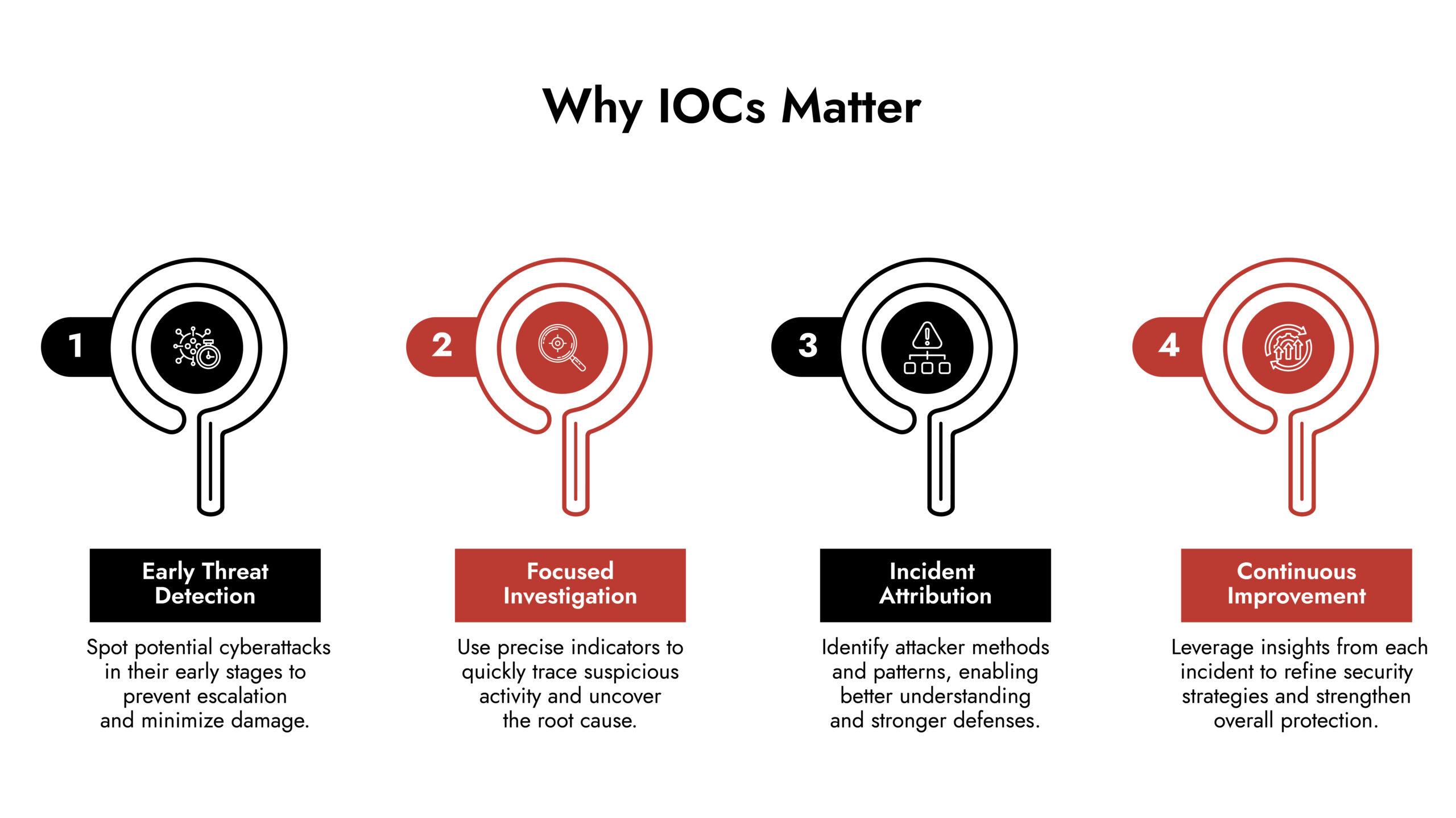
Faster Threat Detection
The difference between catching an attack in hours versus months? Millions of dollars and your reputation. IOCs won’t catch everything, but they compress your response time dramatically. You might not prevent the initial breach, but you can stop the data from walking out the door.
Reduced Investigation Time
Your logs contain thousands of events per second. Good luck finding the malicious ones manually. IOCs act like a filter they highlight the 0.1% of activity that actually matters. When your SIEM flags a known malicious IP, you’re not wading through false positives. You’re investigating something concrete.
Understanding Attacker Behavior
Attackers aren’t random. They have playbooks, preferred tools, infrastructure they reuse. That malicious domain you blocked today? It might pop up in someone else’s network tomorrow. IOCs let you pattern-match against real threat actor behavior instead of guessing what might happen.
Continuous Defense Improvement
Every incident generates new IOCs. That file hash, that registry key, that suspicious PowerShell command they all go into your knowledge base. Your defenses don’t just respond to threats; they evolve. What looked like a zero-day attack last month becomes a known signature this month.
Types of Indicators of Compromise in Cybersecurity
File-Based Indicators
Malware leaves traces. File hashes work like fingerprints change one byte, the hash changes completely. Attackers can rename files, hide them in obscure folders, or compress them. The hash stays constant. When you’ve got a library of known malicious hashes, scanning becomes trivial.
Windows registry modifications are another goldmine. Malware needs persistence it wants to survive reboots. The registry is where Windows stores startup configurations, so it’s prime real estate for attackers. Spot unauthorized registry changes? Start investigating.
Look for:
- File hashes matching known malware
- Executables in temp directories
- DLLs with suspicious names
- Registry keys that weren’t there yesterday
- Files with doubled extensions (document.pdf.exe)
Network-Based Indicators
Some IPs are just bad. Command and control servers, malware distribution sites, data exfiltration endpoints. You see traffic heading there? Block it and figure out what’s compromised.
Traffic patterns tell stories too. Your accounting department doesn’t normally upload gigabytes of data at midnight. Your developer workstations shouldn’t be connecting to servers in countries where you have no business presence. These anomalies scream “investigate me.”
Watch for:
- Traffic to known malicious IPs
- DNS requests to suspicious domains
- Data leaving your network in unusual volumes
- Connections on weird ports
- Beaconing behavior (regular, periodic connections)
Behavior-Based Indicators
People are creatures of habit. Sarah from accounting logs in at 9 AM from Chicago, checks spreadsheets, leaves at 5 PM. She doesn’t log in from Beijing at 3 AM and start downloading customer databases. That’s either a compromised account or something worse.
Failed login attempts matter too. One or two? Fat fingers. Fifty? Someone’s brute-forcing passwords. Successful logins to multiple accounts from one machine? Lateral movement after initial compromise.
System processes have normal signatures. Chrome shouldn’t be running from C:\Windows\Temp. Svchost.exe shouldn’t be making outbound connections to random IPs. When processes deviate from expected behavior, dig deeper.
Check for:
- Login anomalies (time, location, frequency)
- Privilege escalation attempts
- Unusual file access patterns
- Processes running from strange locations
- Resource consumption spikes
Email-Based Indicators
Email remains attackers’ favorite entry point. Phishing attempts have patterns urgent language (“Your account will be suspended!”), requests for credentials, mismatched link text and URLs, suspicious attachments.
Advanced attacks use compromised legitimate accounts, making them harder to spot. But even sophisticated phishing has tells: slight variations in communication style, links to newly registered domains, attachments with macro-laden Office documents when your company never uses macros.
Red flags:
- Sender addresses that almost match legitimate ones
- Pressure tactics (“Wire this money NOW”)
- Attachments you weren’t expecting
- Links that don’t match visible text
- Grammar that’s slightly off
- Requests that bypass normal procedures
Endpoint-Based Indicators
Endpoints are ground zero. An attacker gets in, establishes presence, then pivots. Catching malicious processes early stops lateral movement.
File integrity monitoring catches unauthorized changes. When system files get modified without legitimate updates, something’s wrong. Same with configuration files, startup items, scheduled tasks.
Monitor:
- Processes you don’t recognize
- Unexpected network listeners
Implementing IOCs Effectively
Baseline Your Environment
You can’t spot abnormal without knowing normal. Spend time understanding your network’s rhythm. What does typical traffic look like? When do users log in? What processes always run? This baseline makes genuine threats obvious.
Automating IOC Detection
Humans can’t watch everything. Automated systems can. Configure your tools to alert on specific IOCs known malicious IPs, file hashes, behavioral patterns. Let machines do machine work. Save human attention for complex investigations.
Using Threat Intelligence Feeds
Other organizations get attacked constantly. Their IOCs become your early warnings. Subscribe to quality threat intelligence feeds. When someone discovers a new malware variant, you’ll know about it hours later instead of months.
Handling False Positives
IOCs generate false positives. That’s fine. Investigate methodically. Correlate multiple indicators. A single weird event might be nothing. Three indicators pointing to the same compromised host? That’s different.
Documenting Your Findings
Each incident teaches you something specific to your environment. That weird PowerShell script attackers used? Document it. That particular phishing template? Save it. Your registry modification? Add it to the list. Build institutional memory.
Real-World IOC Investigation
Your monitoring system flags outbound traffic to an IP you’ve never seen. Investigation shows it originated from Bob’s workstation in accounting. You check the machine remotely and find a scheduled task created three days ago that you didn’t authorize. The task runs a PowerShell script that’s consuming resources.
You trace back through Bob’s recent activity. He received an Excel file via email last week with macros enabled. The macro dropped malware with a specific file hash. That malware created the scheduled task, which has been quietly collecting data and attempting to exfiltrate it.
Each IOC led to the next. Network traffic → endpoint process → scheduled task → malicious file → phishing email. Without IOCs, this could have run for months. With them, you contained it in hours.
Building Your IOC Program
Start small. Pick your most critical systems. Monitor those first. Expand gradually.
Integrate threat intelligence feeds into existing security tools. You probably already have a SIEM or EDR platform. Use it properly.
Train your team to spot indicators manually. Automation catches most things, but human intuition catches edge cases.
Review quarterly. Attackers change tactics. Your IOC library needs to evolve. What mattered six months ago might be irrelevant now.
Share anonymized IOCs with industry peers through ISACs or threat sharing platforms. Everyone benefits when everyone contributes.
NetWitness IOC Capabilities
NetWitness built its platform around making IOCs actionable, not just detectable. The difference matters.
The platform monitors network traffic, endpoints, user behavior, and logs continuously. When an IOC appears anywhere—a known malicious IP in your traffic, a suspicious file hash on a workstation—NetWitness flags it immediately. No waiting for batch scans. No scheduled reports that might miss active attacks.
Their User and Entity Behavior Analytics (UEBA) goes beyond signature matching. It learns what normal looks like in your specific environment, then alerts on deviations. This catches novel attacks that don’t match known IOC databases. Zero-day exploits. Custom malware. Insider threats.
NetWitness integrates both proprietary and third-party threat intelligence feeds. When someone discovers a new malicious domain or IP anywhere in the security community, the platform knows about it. Your defenses stay current without manual updates or configuration changes.
Detection without response is just expensive alerting. NetWitness connects identification to action. The system doesn’t just tell you about compromised endpoints; it gives you tools to isolate them immediately. Suspicious network traffic doesn’t just generate tickets; you can block it while investigating.
When incidents escalate beyond your team’s capacity, NetWitness Incident Response Services brings experienced Incident Response specialists into play. They use the platform’s forensics capabilities to investigate quickly and guide remediation. This matters during ransomware attacks or when you’re staring at evidence of months-long data exfiltration.
The platform treats IOCs as puzzle pieces in a larger picture. Individual indicators matter less than understanding the complete attack chain and responding effectively to all of it.
Bottom Line
IOCs won’t stop every attack. They won’t eliminate breaches. Perfect security doesn’t exist outside of marketing brochures.
What IOCs do is compress your response time from months to hours. They turn overwhelming log data into specific leads. They help you learn from each incident and improve your defenses incrementally.
You’re not aiming for perfection. You’re aiming for detection fast enough that response matters. IOCs make that achievable.
Want to see how NetWitness strengthens threat detection with advanced IOC integration? Contact us to explore what that looks like for your specific environment.